How to Import SMTP SSL Certificate Into OMS for Email Notifications

This post is to demonstrate how to import mail server  like Gmail SMTP SSL certificates into Oracle 13c OMS for sending email notifications.

Oracle should have automated this process to make DBA life easier.

Without importing mail server’s SMTP SSL certificates, you might get following errors when configuring and testing email notifications.

 Test failed with message: "Could not connect to SMTP host: 
 <smtp.domain>, port: <port>, response: -1" [SMTP Server: 
<smtp.domain>:<port>, User name:<username>,Secure Connection: TLS.
Test failed with message: "Exception reading response" ...
Test failed with message: "Can't send command to SMTP host" ...
Test failed with message: "Could not convert socket to TLS" ...
Test failed with message: "530 5.7.57 SMTP; Client was not 
authenticated to send anonymous mail during MAIL FROM ...

This is because the SMTP server has been configured with a custom SSL certificate which needs to be imported into the Enterprise Manager.

Now we follow the following steps to manually import the Gmail SMTP server’s SSL certificate into the JDK used by the Oracle 13c OMS.

Subscribe to get access

Read more of this content when you subscribe today.

Finally test mail server, and receive an email successfully.

Go to Oracle 13c Enterprise Manager Console -> Setup -> Notifications -> Mail Servers,
Click on ‘Test Mail Servers’ button and verify whether a test email is sent to the Email ID specified for the ‘Sender’s E-mail Address’ field.
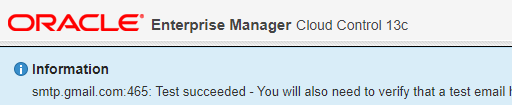
The test email will contain one line with following content.

This test e-mail message from Oracle Enterprise Manager indicates a 
successful configuration of your e-mail address and mail server.

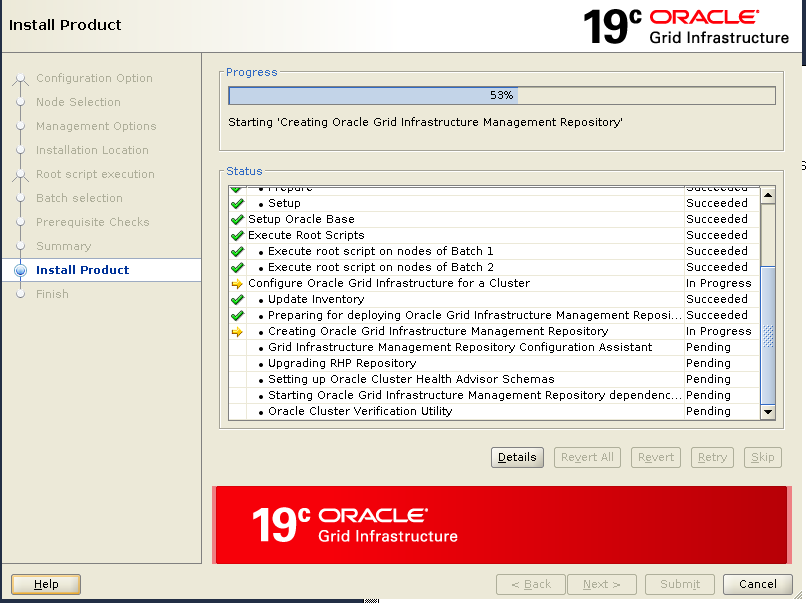
Creating Oracle Grid Infrastructure Management Repository Failed with ORA-15221

When upgrading Oracle 18c GI to 19c GI, Creating Oracle Grid Infrastructure Management Repository Failed.

Subscribe to get access

Read more of this content when you subscribe today.

Retry and continue the upgrading process successfully.

Running runcluvfy.sh Fails with PRVG-11250 : The check “RPM Package Manager database” was not performed because it needs ‘root’ user privileges.

Before upgrading Oracle 18c GI to 19c GI, to check the readiness of your Oracle Clusterware installation for upgrading, running runcluvfy.sh gets PRVG-11250 errors:

[grid@racnode1 grid]$ ./runcluvfy.sh stage -pre crsinst -upgrade -rolling \
-src_crshome /u01/app/18.0.0/grid -dest_crshome /u01/app/19.0.0/grid \
-dest_version 19.6.0.0 -verbose 
...
..
.
Verifying RPM Package Manager database ...INFORMATION
PRVG-11250 : The check "RPM Package Manager database" was not performed 
because it needs 'root' user privileges.
...
..
.

Subscribe to get access

Read more of this content when you subscribe today.

gridSetup.sh Fails with “ERROR: The home is not clean”

Before upgrading Oracle 18c GI to 19c GI, trying to apply the latest GI RU patches onto 19c gold image, it fails like following:

[grid@racnode1 grid]$ ./gridSetup.sh -silent -applyRU /media/sf_Software/Patches/19c/30463609
Preparing the home to patch...
Applying the patch /media/sf_Software/Patches/19c/30463609...
OPatch command failed while applying the patch. For details look at the logs from /u01/app/19.0.0/grid/cfgtoollogs/opatchauto/

It is because the patch path is not correct, patch 30463609 is Combo of OJVM  and GI. The correct path should be the sub-directory one.

[grid@racnode1 grid]$ ./gridSetup.sh -silent -applyRU /media/sf_Software/Patches/19c/30463609/30501910

ERROR: The home is not clean. This home cannot be used since there was a failed OPatch execution in this home. Use a different home to proceed.

When the command gridSetup.sh fails,  it makes the NEW_HOME unusable.

The only way to get around this issue currently is to clean the contents out of that HOME , and unzip the gold image again.

[grid@racnode1 ~]$ cd /u01/app/19.0.0/grid/
[grid@racnode1 grid]$ rm -fr * 
[grid@racnode1 grid]$ unzip <SW-LOCATION>/LINUX.X64_193000_grid_home.zip -d ./
[grid@racnode1 grid]$ ./gridSetup.sh -silent -applyRU /media/sf_Software/Patches/19c/30463609/30501910
Preparing the home to patch...
Applying the patch /media/sf_Software/Patches/19c/30463609/30501910...
Successfully applied the patch.
The log can be found at: /u01/app/oraInventory/logs/GridSetupActions2020-04-11_10-53-32PM/installerPatchActions_2020-04-11_10-53-32PM.log
Launching Oracle Grid Infrastructure Setup Wizard...

[FATAL] [INS-40426] Grid installation option has not been specified.
   ACTION: Specify the valid installation option.
[grid@racnode1 grid]$

How to Apply the Latest RU/RUR Patches onto 19c Gold Image Before Upgrading 18c GI to 19c GI

While upgrading GI from 18c to 19c, in order to minimize the downtime and reduce the impact on PROD environment, also minimize the risk of upgrading failure, Release Update(RU) or Release Update Reversion(RUR) patches can be applied onto new 19c GI image before upgrading 19c GI.

Subscribe to get access

Read more of this content when you subscribe today.