
Blog

PLS-00201: identifier ‘SYS.DBMS_DATAPUMP’ must be declared

DataPump impdp or expdp requires a PDB open mode.

SYMPOTMS

When trying to run datapump impdp into a PDB, the following errors occurred:

UDI-06550: operation generated ORACLE error 6550
ORA-06550: line 1, column 100:
PLS-00201: identifier 'SYS.DBMS_DATAPUMP' must be declared
ORA-06550: line 1, column 100:
PL/SQL: Statement ignored
ORA-06550: line 1, column 202:
PLS-00201: identifier 'SYS.DBMS_DATAPUMP' must be declared
ORA-06550: line 1, column 202:
PL/SQL: Statement ignored

CAUSES

The PDB database is not open.

SQL> show con_name

CON_NAME
------------------------------
pdb1

SQL> select open_mode from v$database;

OPEN_MODE
--------------------
MOUNTED

RESOLUTION

Open the PDB database.

SQL> show con_name

CON_NAME
------------------------------
pdb1

SQL> select open_mode from v$database;

OPEN_MODE
--------------------
MOUNTED

SQL> alter pluggable database open;

Pluggable database altered.

SQL> select open_mode from v$database;

OPEN_MODE
--------------------
READ WRITE
Java SE Installation for ORMB

Installing software into a directory that include spaces in the path name (e.g. C:\Program Files\) might cause issues for some vendor applications.

Purpose

To install the Java SE JDK 1.8 as a prerequisite for deploying ORMB 2.5.0.1.

Download Java

Download required JDK 1.8 binary (  jdk-8u112-windows-x64.exe )  here.

Install Java

It is strongly advised to choose an installation directory that does not include spaces in the path name (e.g., do NOT install in C:\Program Files\). Some software will throw exceptions that depend on the value of JAVA_HOME, which either includes a space,or defines as “C:\Progra~1\”. 

  • Run  jdk-8u112-windows-x64.exe.
  • Change the installation directory to a path with no spaces in it, such as D:\jdk1.8.
  • All other installation defaults are accepted.
  • When the installer gets to the stage of installing the J2SE Runtime Environment, it is fine to accept the default, e.g., C:\Program Files\Java.
  • Add Java’s bin directory (e.g.,  D:\jdk1.8\bin) to your PATH environment.
  • Set JAVA_HOME (  e.g., D:\jdk1.8 ).

How to Open PDBs Automatically After CDB Opened

To open pdbs automatically, for 12.1.0.1, write a database startup trigger. for 12.1.0.2 onwards, open pdbs first, then save the pdbs state.

1) For 12.1.0.1, create a trigger to startup PDBs while CBD is up running.

CREATE OR REPLACE TRIGGER auto_open_pdbs 
  AFTER STARTUP ON DATABASE 
BEGIN 
   EXECUTE IMMEDIATE 'ALTER PLUGGABLE DATABASE ALL OPEN'; 
END auto_open_pdbs;
/

2) For 12.1.0.2 onwards including 12.1.0.2, 12.2.0.1, 18c, 19c,and 20c ….

Run below command to open pluggable database, and save the state of PDBs.

ALTER PLUGGABLE DATABASE pdb1 OPEN;
ALTER PLUGGABLE DATABASE pdb1 SAVE STATE;

— For RAC

SQL > ALTER PLUGGABLE DATABASE pdb1 OPEN INSTANCES=all;
SQL > ALTER PLUGGABLE DATABASE pdb1 SAVE STATE INSTANCES=all;

SQL> select CON_ID,CON_NAME,INSTANCE_NAME,STATE,RESTRICTED from dba_pdb_saved_states;

CON_ID CON_NAME INSTANCE_NAM STATE RES
---------- ------- ------------ -------------- ---
3 PDB1 CDB1 OPEN NO
3 PDB1 CDB1 OPEN NO

Check the saved state of containers :

SELECT con_name, instance_name, state FROM dba_pdb_saved_states;

CON_NAME             INSTANCE_NAME        STATE
-------------------- -------------------- --------------
PDB1                 cdb1                 OPEN

SELECT name, open_mode FROM v$pdbs;

NAME                           OPEN_MODE
------------------------------ ----------
PDB$SEED                       READ ONLY
PDB1                           READ WRITE

Shutdown and startup database, the PDB starts up automatically.

shutdown immediate;
startup;

SELECT name, open_mode FROM v$pdbs;

NAME                           OPEN_MODE
------------------------------ ----------
PDB$SEED                       READ ONLY
PDB1                           READ WRITE

To discard any saved state of a pluggable database using below statement.

SQL>alter pluggable database PDB1 discard state instances=all;

Pluggable database altered.

SQL> select CON_ID,CON_NAME,INSTANCE_NAME,STATE,RESTRICTED from dba_pdb_saved_states;

no rows selected

How to Run Security Utility in ORMB Multiple Instances Environment

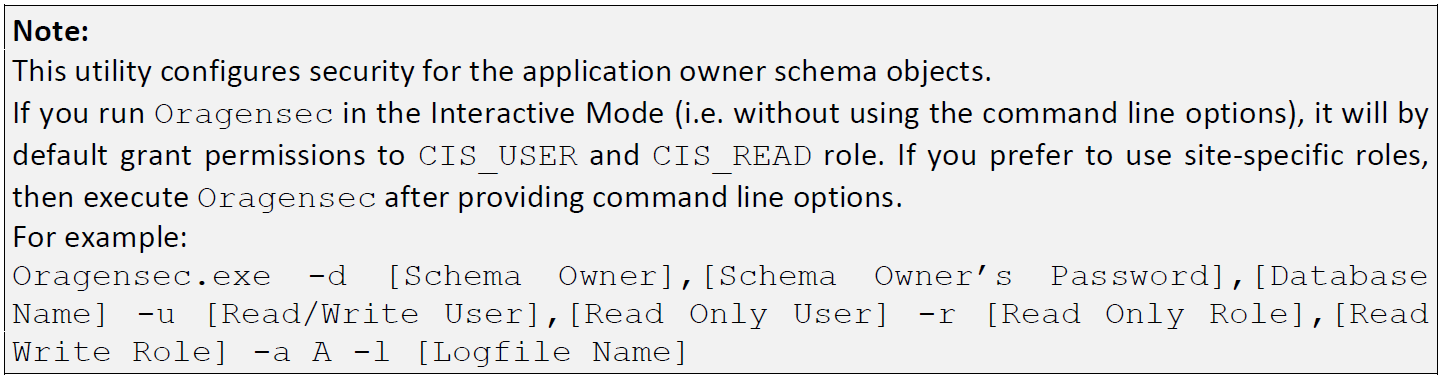
In ORMB multiple instances environment, run security utility “OraGenSec.exe” by providing non-default information like schema, password, DB connection ,roles,etc.

There are situations  when there are multiple ORMB ( Oracle Revenue Management and Billing ) database instances in one physical database. Normally we run security utility in interactive  mode. It will by default grant permissions to CIS_USER and CIS_READ role.

So for non-default schemas in multiple ORMB database instances environment, we need execute Oragensec by providing command line options, for example ;

d:\..\RMB\Security>OraGenSec.exe -d CISADM_1,PASSWORD,ORMB -u CISUSER_1,CISREAD_1 -r CIS_READ_1
,CIS_USER_1 -a A -l OraGenSec_Security_Log.txt

Generating Security ...

Security privileges and Synonyms generated successfully, Now Exiting ...

d:\RMB\RMB-V2.5.0.1.0-Oracle-Database-MultiPlatform\RMB\Security>dir

05/04/2013 09:31 PM 86 oragensec.bat
05/04/2013 09:31 PM 2,355,284 OraGenSec.exe
11/11/2016 03:30 PM 362,138 security_log.txt

d:\RMB\RMB-V2.5.0.1.0-Oracle-Database-MultiPlatform\RMB\Security>type oragensec.bat
oragensec -d cisadm,cisadm,database-name -r cis_read,cis_user -a A -u cisuser,cisread

CISADM_1 :  Database user that owns the application schema .
PASSWORD:  Password for user CISADM_1.
ORMB: TNS entry in tnsnames.ora.
CISUSER_1:  Database user that has read-write (select, update, insert, and delete) privileges to the objects in the application schema ( CISADM_1). The application will access the database as this user.
CISREAD_1:  Database user with read-only privileges to the objects in the application schema( CISADM_1).
CIS_USER_1:  Database role that has read-write (select, update, insert, and delete) privileges to the objects in the application schema (CISADM_1).
CIS_READ_1:  Database role with read-only privileges to the objects in the application schema (CISADM_1).

capture

Oracle Revenue Management and Billing ( ORMB ) Security Utility OraGenSec

To generate security for ORMB by using “OraGenSec.exe

Here is an example of how to run ORMB 2.5.0.1 security utility — OraGenSec.exe.

1) Make sure database vault must be disabled before running. To check database vault is enabled or not.

SQL>SELECT * 
      FROM V$OPTION 
     WHERE PARAMETER = 'Oracle Database Vault';

PARAMETER              VALUE    CON_ID
---------------------- -------- --------------
Oracle Database Vault  FALSE    0

2) Execute the OraGenSec.exe utility.

d:\RMB\RMB-V2.5.0.1.0-Oracle-Database-MultiPlatform\RMB\Security>set JAVA_HOME=d:\RMB\jdk1.8.0_112
d:\RMB\RMB-V2.5.0.1.0-Oracle-Database-MultiPlatform\RMB\Security>set TNS_ADMIN=D:\oracle


d:\RMB\RMB-V2.5.0.1.0-Oracle-Database-MultiPlatform\RMB\Security>where OraGenSec.exe
d:\RMB\RMB-V2.5.0.1.0-Oracle-Database-MultiPlatform\RMB\Security\OraGenSec.exe

d:\RMB\RMB-V2.5.0.1.0-Oracle-Database-MultiPlatform\RMB\Security>.\OraGenSec.exe

Enter the application read-only user or Schema Owner in the database: CISADM

Enter the password for the CISADM user:

Enter the name of the Oracle database: ORMB


Enter a comma-separated list of Oracle users in which synonyms need to be created (e.g. cisuser,cisread): CISUSER,CISREAD


Select the following options:

(A/a): Generate security for All objects in the Database?

(O/o): Generate security for specific Objects inputted in this terminal?

(F/f): Generate security for specific objects generated from an input File?
A

You have chosen to generate security for all objects in the database.


Connecting to the Target Database ...
User Name : CISADM
Database Name : ORMB

Generating Security ...

Security privileges and Synonyms generated successfully, Now Exiting ...

Press Enter to Continue ...

d:\RMB\RMB-V2.5.0.1.0-Oracle-Database-MultiPlatform\RMB\Security>