
The laptop was upgraded from Windows 8 to Windows 10 . After that ,VirtualBox 5.0 software failed to start up and there was no response at all. The software is neither up nor with any error messages.
Then uninstalled VirtualBox 5.0 and installed latest VirtualBox 5.1.6. It was better this time. But when I tried to start up one Linux virtual server, got this message:
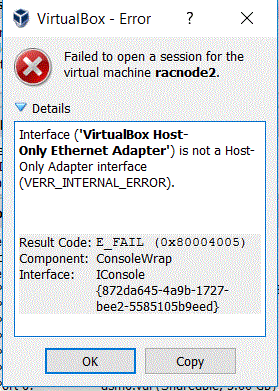
Interface ('VirtualBox Host-Only Ethernet Adapter') is not a Host-Only Adapter interface (VERR_INTERNAL_ERROR).


Result Code:
E_FAIL (0x80004005)
Component:
ConsoleWrap
Interface:
IConsole {872da645-4a9b-1727-bee2-5585105b9eed}
Checked a couple of items, all look fine:
a) Run “VBoxManage list hostonlyifs”
c:\Program Files\Oracle\VirtualBox>VBoxManage list hostonlyifs
Name: VirtualBox Host-Only Ethernet Adapter #2
GUID: be24ca57-3d51-4b39-bb51-5675a36f571b
DHCP: Disabled
IPAddress: 192.168.56.1
NetworkMask: 255.255.255.0
IPV6Address: fe80:0000:0000:0000:2561:106d:eb4c:7410
IPV6NetworkMaskPrefixLength: 64
HardwareAddress: 0a:00:27:00:00:18
MediumType: Ethernet
Status: Up
VBoxNetworkName: HostInterfaceNetworking-VirtualBox Host-Only Ethernet Adapter #2
b) Go to File->Preference->Network->Host-only Network Details, looks good.

c) “VirtualBox NDIS6 Briged Networking Driver” is checked:

d) Click refresh button to get a new “MAC ADDRESS”.

e) After the new “MAC ADDRESS”, then everything is working fine. Linux virtual machine server started up successfully.
So it is working by giving a new “MAC address”. Amazing !
 Make DBA Life Easy