
“SELECT MEDIA FROM V$BACKUP_PIECE_DETAILS” Takes Long Time and Uses Huge Temp Space

It is a good practice for DBA to periodically collect stats of fixed objects, data dictionary, SYS and SYSTEM schemas,

The following query from OEM agent keeps failing, after upgrading Enterprise Manager Cloud Control and a monitoring agent to 13.2, this query is run in the 11.2.0.4 target database:

SELECT MEDIA
 FROM V$BACKUP_PIECE_DETAILS
 WHERE SESSION_KEY=:B3 AND SESSION_RECID=:B2 AND SESSION_STAMP=:B1 
   AND DEVICE_TYPE = 'SBT_TAPE' AND ROWNUM = 1

Also it uses huge temp space :

SQL> select USERNAME,TABLESPACE,BLOCKS*8/1024/1024 
      from V$TEMPSEG_USAGE 
  order by BLOCKS desc ;

USERNAME   TABLESPACE                       BLOCKS*8/1024/1024
---------- ------------------------------- ------------------
DBSNMP     TEMP                             30.649414

It is the exact same issue as per (Doc ID 2201982.1). so the following actions are taken :

SQL> exec dbms_stats.gather_fixed_objects_stats;

PL/SQL procedure successfully completed.

SQL> exec dbms_stats.gather_schema_stats ('SYSTEM');

PL/SQL procedure successfully completed.

SQL> exec dbms_stats.gather_schema_stats ('SYS');

PL/SQL procedure successfully completed.

SQL> exec dbms_stats.gather_dictionary_stats;

PL/SQL procedure successfully completed.

Finally flush the cursor out of memory for next running :

SQL> select address, hash_value,PLAN_HASH_VALUE, executions, 
            loads, version_count, invalidations, parse_calls 
      from v$sqlarea 
     where sql_id='dx4nqvbtu06bx';

ADDRESS          HASH_VALUE PLAN_HASH_VALUE EXECUTIONS LOADS    
---------------- ---------- --------------- ---------- -----
VERSION_COUNT INVALIDATIONS PARSE_CALLS
------------- ------------- -----------
00000001418FA048 4087355773 1896464546      213        5          
1             1             213

SQL> exec dbms_shared_pool.purge('00000001418FA048,4087355773','C');

PL/SQL procedure successfully completed.

SQL> select address, hash_value,PLAN_HASH_VALUE, executions, loads, 
            version_count, invalidations, parse_calls 
       from v$sqlarea 
      where sql_id='dx4nqvbtu06bx';

no rows selected

Have a check of the new execution time. We can see the new execution plan is created, and the execution time is only 0.25 second.

SQL> select address, hash_value,PLAN_HASH_VALUE, executions,
            ELAPSED_TIME,ELAPSED_TIME/executions/1000000 TimePerExecution
      from v$sqlarea 
     where sql_id='dx4nqvbtu06bx';

ADDRESS          HASH_VALUE  PLAN_HASH_VALUE EXECUTIONS ELAPSED_TIME 
---------------- ----------- --------------- ---------- ------------ 
TIMEPEREXECUTION
----------------
00000001418FA048   4087355773   75529090       2          504858       .252429

OEM Agent Throws Error “Internal error detected: oracle.sysman.gcagent.task.TaskZombieException:oracle.sysman.gcagent.task.TaskFutureImpl$WrappedTask:620”

Apply some hidden parameters into emd.properties file, then bounce the agent. It might fix some internal issues.

In OEM 13c, a couple of OEM agents reported some internal errors  like :

Internal error detected: oracle.sysman.gcagent.task.TaskZombieException:oracle.sysman.gcagent.task.TaskFutureImpl$WrappedTask:620

Internal error detected: oracle.sysman.gcagent.task.TaskZombieException:oracle.sysman.gcagent.task.TaskFutureImpl$WrappedTask:621

From: oracle 
Sent: Monday, 13 February 2017 10:41 AM
To: 
Subject: EM Event: Critical:ractest:3872 - Internal error detected: oracle.sysman.gcagent.task.TaskZombieException:oracle.sysman.gcagent.task.TaskFutureImpl$WrappedTask:620.

Host=ractest
Target type=Agent 
Target name=ractest:3872 
Categories=Diagnostics 
Message=Internal error detected: oracle.sysman.gcagent.task.TaskZombieException:oracle.sysman.gcagent.task.TaskFutureImpl$WrappedTask:620. 
Severity=Critical 
...
..
.
Update Details:
Internal error detected: oracle.sysman.gcagent.task.TaskZombieException:oracle.sysman.gcagent.task.TaskFutureImpl$WrappedTask:620.

Extracted from gcagent.log :

2017-02-13 10:10:00,329 [256:7761FFD4] WARN - IntervalSchedule: Skip schedule [rac_database:RACTEST:observer_11g] - skipping due to execution time exceeding interval
2017-02-13 10:10:00,329 [257:B85D2018:GC.Executor.6 (oracle_database:RACTEST:Response)] WARN - IntervalSchedule: Skip schedule [oracle_database:RACTEST:Response] - skipping due to execution time exceeding interval
2017-02-13 10:10:00,329 [258:5A4306F7:GC.Executor.7 (rac_database:RACTEST:observer_11g)] WARN - Action result processing failure rac_database.RACTEST::observer_11g
java.lang.InterruptedException 
 at java.util.concurrent.locks.AbstractQueuedSynchronizer.tryAcquireSharedNanos(AbstractQueuedSynchronizer.java:1302)
...
..
.
oracle.sysman.gcagent.task.TaskZombieException: task declared as a zombie
 at oracle.sysman.gcagent.task.TaskFutureImpl$WrappedTask.accountedCall(TaskFutureImpl.java:620)
 at oracle.sysman.gcagent.task.TaskFutureImpl$WrappedTask.call(TaskFutureImpl.java:643)
 at java.util.concurrent.FutureTask$Sync.innerRun(FutureTask.java:303)
 at java.util.concurrent.FutureTask.run(FutureTask.java:138)
 at oracle.sysman.gcagent.task.TaskFutureImpl.run1(TaskFutureImpl.java:380)
...
..
. 

 at java.lang.Thread.run(Thread.java:662)
2017-02-13 10:10:00,331 [257:GC.Executor.6] ERROR - Critical error:
oracle.sysman.gcagent.task.TaskZombieException: task declared as a zombie
 at oracle.sysman.gcagent.task.TaskFutureImpl$WrappedTask.accountedCall(TaskFutureImpl.java:620)
 at oracle.sysman.gcagent.task.TaskFutureImpl$WrappedTask.call(TaskFutureImpl.java:643)

WORKAROUND

Subscribe to get access

Read more of this content when you subscribe today.

ME ( Metric Extension ) Metric Is Not Collected For Some Databases

By default, ME metric will not be collected if associated target has a severity on response:state metric. So override this default by explicitly choosing Advanced option while creating ME.

For some databases, ME ( Metric Extension ) is not collecting data. But for the rest databases, it is working fine.

me_not_collecting

Checking the ME ( Metric Extension ) definition and found an advanced option is not selected.

selection

After creating a new version of this ME ( Metric Extension ) by checking this mentioned option, it works fine.

The reason is  this database has frequent Warning/Critical response metric alert. like  :

…..
….

Event Type=Metric Alert
Event name=Server_Adaptive_Threshold_Metric:instance_efficiency__response_time_pt
Metric Group=Server_Adaptive_Threshold_Metric
Metric=Response Time Per Txn
Metric value=258.497253691275
Key Value=SYSTEM
Rule Name=DEFAULT_RULESET_FOR_ALL_TARGETS,METRIC_ALERT_INCIDENT_CREATION
Rule Owner=
Update Details:
Metrics “Response Time Per Txn” is at 258.497
Incident created by rule (Name = Incident management rule set for all targets, Create incident for critical metric alerts [System generated rule]).

Use Corrective Action ( CA ) to Automate Archivelog Backup When FRA Usage is Over Threshold of Metric Extension ( ME ) in OEM

Take advantage of OEM Corrective Action ( CA ) to automate archive logs backup after FRA usage over threshold.

In Previous posts, we have created following related posts:

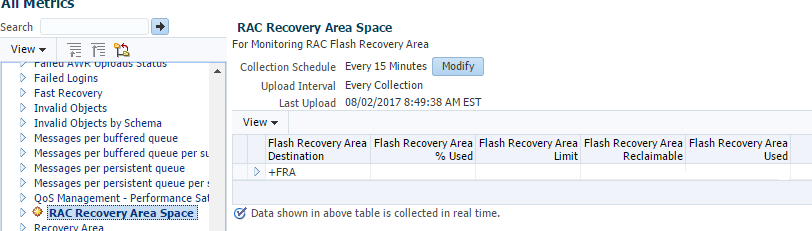
  1. Create a Metric Extension (ME) to Monitor FRA Usage on OEM
  2. Create an Incident Rule for Metric Extension ( ME ) to Monitor FRA Used in OEM

Now and then, FRA usage is easily over threshold, DBA needs logon system and manually run an archivelog backup.  It is easily to make database hung if FRA usage is 100%.

Here we use “Corrective Actions” to run a RMAN archivelog backup when the FRA usage is over warning / Critical threshold.

Subscribe to get access

Read more of this content when you subscribe today.

10) After a little while, an alert is received about “Corrective action status=Succeed”

Corrective action=RMAN_AUTO_BACKUP_ARCHIVELOGS
Corrective action owner=SYSMAN 
Corrective action status=Succeeded 
Corrective action output=SID: RACTEST1
HOME: /u01/app/oracle/product/11.2.0/dbhome_1
BASE: /u01/app/oracle
SID: RACTEST1
HOME: /u01/app/oracle/product/11.2.0/dbhome_1
BASE: /u01/app/oracle

Host=RACTEST1.ractest 
Target type=Cluster Database 
Target name=RACTEST-CLUSTER 
Categories=Capacity 
Message=The value of Flash Recovery Area % Used for +FRA is 82
Severity=Warning 
Event reported time=Dec 22, 2016 9:01:54 PM EST 
Target Lifecycle Status=Development 
Comment=RAC TEST
Operating System=Linux
Platform=x86_64
Associated Incident Id=209879 
Associated Incident Status=New 
Associated Incident Acknowledged By Owner=No 
Associated Incident Priority=High 
Associated Incident Escalation Level=0 
Event Type=Metric Alert 
Event name=ME$RACRecoveryAreaSpace:FRA_PERCENT_USED 
Metric Group=ME$RACRecoveryAreaSpace
Metric=FRA_PERCENT_USED
Metric value=82
Key Value=+FRA
Key Column 1=FRA_NAME
Rule Name=Flash Recovery Area Percent Used for ME

Create an Incident Rule for Metric Extension ( ME ) to Monitor FRA Used in OEM

Step by step demonstrates how to create an incident rule for a Metric Extension ( ME).

In another post, we created a Metric Extension (ME) to Monitor FRA Usage on OEM. Here we need create an Incident Rule for creating an incident and notification for all events of Warning or Critical.

Subscribe to get access

Read more of this content when you subscribe today.

8) After a couple of minutes, the below alert is received:

Host=ractest1 
Target type=Cluster Database 
Target name=RACTEST
Categories=Capacity 
Message=The value of Flash Recovery Area % Used for +FRA is 80 
Severity=Warning 
Event reported time=Dec 22, 2016 3:08:43 AM EST 
Target Lifecycle Status=TEST
Comment=RACTEST CLuster
Operating System=Linux
Platform=x86_64
Associated Incident Id=209693 
Associated Incident Status=New 
Associated Incident Owner=TESTUSER
Associated Incident Acknowledged By Owner=No 
Associated Incident Priority=High 
Associated Incident Escalation Level=0 
Event Type=Metric Alert 
Event name=ME$RACRecoveryAreaSpace:FRA_PERCENT_USED 
Metric Group=ME$RACRecoveryAreaSpace
Metric=FRA_PERCENT_USED
Metric value=80
Key Value=+FRA
Key Column 1=FRA_NAME
Rule Name=RACTEST Ruleset,Flash Recovery Area Percent Used for ME 
Rule Owner=TESTUSER
Update Details:
The value of Flash Recovery Area % Used for +FRA is 80
Incident created by rule (Name = RACTEST Ruleset, Flash Recovery Area Percent Used for ME; Owner = TESTUSER).