On Linux 7, while running TFA or ORAchk, it might fail with below errors:
[oracle@racnode1 orachk]$ which perl
/bin/perl

[oracle@racnode1 orachk]$ ./orachk -u -o pre

Enter upgrade target version (valid versions are 11.2.0.4.0, 12.1.0.2.0,
12.2.0.1.0, 18.0.0.0.0, 19.0.0.0.0, 20.0.0.0.0) 3 tries left:- 12.2.0.1.0

Clusterware stack is running from /u01/app/12.1.0/grid.
                     Is this the correct Clusterware Home?[y/n][y] y
Can't locate Data/Dumper.pm in @INC (@INC contains: /u01/app/oracle/utilities/orachk
/usr/local/lib64/perl5 /usr/local/share/perl5 /usr/lib64/perl5/vendor_perl
/usr/share/perl5/vendor_perl /usr/lib64/perl5 /usr/share/perl5 .)
at /u01/app/oracle/utilities/orachk/.cgrep/discoverdbasm.pl line 24.
BEGIN failed--compilation aborted at /u01/app/oracle/utilities/orachk/
.cgrep/discoverdbasm.pl line 24.
SOLUTION
Use Oracle Perl instead of Linux 7 Perl.
$ export PATH=/u01/app/oracle/product/12.1.0/dbhome_1/perl/bin:$PATH

$ which perl
/u01/app/oracle/product/12.1.0/dbhome_1/perl/bin/perl
4) Apply GI and DB PSU on first node, then do the same on second node.
As root user, execute the following command on each node of the cluster:
# /u01/app/12.1.0/grid/OPatch/opatchauto apply /tmp/29698592

OPatchauto session is initiated at Sun Jul 28 22:39:56 2019

System initialization log file is /u01/app/12.1.0/grid/cfgtoollogs/opatchautodb/systemconfig2019-07-28_10-49-47PM.log.

Session log file is /u01/app/12.1.0/grid/cfgtoollogs/opatchauto/opatchauto2019-07-28_10-51-20PM.log
The id for this session is B1YJ

Executing OPatch prereq operations to verify patch applicability on home /u01/app/12.1.0/grid

Executing OPatch prereq operations to verify patch applicability on home /u01/app/oracle/product/12.1.0/dbhome_1
Patch applicability verified successfully on home /u01/app/oracle/product/12.1.0/dbhome_1

Patch applicability verified successfully on home /u01/app/12.1.0/grid
Verifying SQL patch applicability on home /u01/app/oracle/product/12.1.0/dbhome_1
SQL patch applicability verified successfully on home /u01/app/oracle/product/12.1.0/dbhome_1
Preparing to bring down database service on home /u01/app/oracle/product/12.1.0/dbhome_1
Successfully prepared home /u01/app/oracle/product/12.1.0/dbhome_1 to bring down database service
Bringing down CRS service on home /u01/app/12.1.0/grid
Prepatch operation log file location: /u01/app/12.1.0/grid/cfgtoollogs/crsconfig/crspatch_racnode1_2019-07-28_11-31-15PM.log
CRS service brought down successfully on home /u01/app/12.1.0/grid
Performing prepatch operation on home /u01/app/oracle/product/12.1.0/dbhome_1
Perpatch operation completed successfully on home /u01/app/oracle/product/12.1.0/dbhome_1
Start applying binary patch on home /u01/app/oracle/product/12.1.0/dbhome_1
Binary patch applied successfully on home /u01/app/oracle/product/12.1.0/dbhome_1
Performing postpatch operation on home /u01/app/oracle/product/12.1.0/dbhome_1
Postpatch operation completed successfully on home /u01/app/oracle/product/12.1.0/dbhome_1
Start applying binary patch on home /u01/app/12.1.0/grid
Binary patch applied successfully on home /u01/app/12.1.0/grid
Starting CRS service on home /u01/app/12.1.0/grid
Postpatch operation log file location: /u01/app/12.1.0/grid/cfgtoollogs/crsconfig/crspatch_racnode1_2019-07-29_01-30-59AM.log
CRS service started successfully on home /u01/app/12.1.0/grid
Preparing home /u01/app/oracle/product/12.1.0/dbhome_1 after database service restarted
No step execution required.........
Trying to apply SQL patch on home /u01/app/oracle/product/12.1.0/dbhome_1
SQL patch applied successfully on home /u01/app/oracle/product/12.1.0/dbhome_1

OPatchAuto successful.
--------------------------------Summary--------------------------------

Patching is completed successfully. Please find the summary as follows:

Host:racnode1
RAC Home:/u01/app/oracle/product/12.1.0/dbhome_1
Version:12.1.0.2.0
Summary:

==Following patches were SKIPPED:

Patch: /tmp/29698592/26983807
Reason: This patch is not applicable to this specified target type - "rac_database"

Patch: /tmp/29698592/29423125
Reason: This patch is not applicable to this specified target type - "rac_database"
==Following patches were SUCCESSFULLY applied:

Patch: /tmp/29698592/29494060
Log: /u01/app/oracle/product/12.1.0/dbhome_1/cfgtoollogs/opatchauto/core/opatch/opatch2019-07-28_23-34-47PM_1.log

Patch: /tmp/29698592/29509318
Log: /u01/app/oracle/product/12.1.0/dbhome_1/cfgtoollogs/opatchauto/core/opatch/opatch2019-07-28_23-34-47PM_1.log
Host:racnode1
CRS Home:/u01/app/12.1.0/grid
Version:12.1.0.2.0
Summary:

==Following patches were SUCCESSFULLY applied:

Patch: /tmp/29698592/26983807
Log: /u01/app/12.1.0/grid/cfgtoollogs/opatchauto/core/opatch/opatch2019-07-29_00-16-53AM_1.log

Patch: /tmp/29698592/29423125
Log: /u01/app/12.1.0/grid/cfgtoollogs/opatchauto/core/opatch/opatch2019-07-29_00-16-53AM_1.log

Patch: /tmp/29698592/29494060
Log: /u01/app/12.1.0/grid/cfgtoollogs/opatchauto/core/opatch/opatch2019-07-29_00-16-53AM_1.log

Patch: /tmp/29698592/29509318
Log: /u01/app/12.1.0/grid/cfgtoollogs/opatchauto/core/opatch/opatch2019-07-29_00-16-53AM_1.log

OPatchauto session completed at Mon Jul 29 02:12:00 2019
Time taken to complete the session 212 minutes, 4 seconds
[root@racnode1 ~]#
From the log, we can see GI management database was patched as well.
...
..
.
2019-07-29 01:53:43: Mgmtdb is running on node: racnode1; local node: racnode1
2019-07-29 01:53:43: Mgmtdb is running on the local node
2019-07-29 01:53:43: Starting to patch Mgmt DB ...
2019-07-29 01:53:43: Invoking "/u01/app/12.1.0/grid/sqlpatch/sqlpatch -db -MGMTDB"
2019-07-29 01:53:43: Running as user grid: /u01/app/12.1.0/grid/sqlpatch/sqlpatch -db -MGMTDB
2019-07-29 01:53:43: Invoking "/u01/app/12.1.0/grid/sqlpatch/sqlpatch -db -MGMTDB" as user "grid"
2019-07-29 01:53:43: Executing /bin/su grid -c "/u01/app/12.1.0/grid/sqlpatch/sqlpatch -db -MGMTDB"
2019-07-29 01:53:43: Executing cmd: /bin/su grid -c "/u01/app/12.1.0/grid/sqlpatch/sqlpatch -db -MGMTDB"
[oracle@racnode2 29774383]$ sqlplus /nolog

SQL>  CONNECT / AS SYSDBA
Connected to an idle instance.

SQL> STARTUP
ORACLE instance started.
Database mounted.
Database opened.

alter system set cluster_database=false scope=spfile;
System altered.

[oracle@racnode2 29774383]$ srvctl stop database -d RACTEST
[oracle@racnode2 29774383]$ sqlplus /nolog

SQL> CONNECT / AS SYSDBA
Connected to an idle instance.

SQL> STARTUP UPGRADE
ORACLE instance started.
Database mounted.
Database opened.

SQL> alter pluggable database all open upgrade;

Pluggable database altered.
[oracle@racnode2 29774383]$ cd $ORACLE_HOME/OPatch
[oracle@racnode2 OPatch]$ ./datapatch -verbose
SQL Patching tool version 12.1.0.2.0 Production on Wed Jul 31 21:21:07 2019
Copyright (c) 2012, 2016, Oracle.  All rights reserved.

Log file for this invocation: /u01/app/oracle/cfgtoollogs/sqlpatch/
                 sqlpatch_25124_2019_07_31_21_21_07/sqlpatch_invocation.log

Connecting to database...OK
Note:  Datapatch will only apply or rollback SQL fixes for PDBs
       that are in an open state, no patches will be applied to closed PDBs.
    Please refer to Note: Datapatch: Database 12c Post Patch SQL Automation
       (Doc ID 1585822.1)
Bootstrapping registry and package to current versions...done
Determining current state...done

Current state of SQL patches:
Patch 29774383 (Database PSU 12.1.0.2.190716, Oracle JavaVM Component (JUL2019)):
  Installed in the binary registry only
Bundle series PSU:
  ID 190716 in the binary registry and ID 190716 in PDB CDB$ROOT, ID 190716 in PDB PDB$SEED, ID 190716 in PDB PDB_A

Adding patches to installation queue and performing prereq checks...
Installation queue:
  For the following PDBs: CDB$ROOT PDB$SEED PDB_A
    Nothing to roll back
    The following patches will be applied:
      29774383 (Database PSU 12.1.0.2.190716, Oracle JavaVM Component (JUL2019))

Installing patches...
Patch installation complete.  Total patches installed: 3

Validating logfiles...
Patch 29774383 apply (pdb CDB$ROOT): SUCCESS
  logfile: /u01/app/oracle/cfgtoollogs/sqlpatch/29774383/22961858/29774383_apply_RACTEST_CDBROOT_2019Jul31_21_22_21.log (no errors)
Patch 29774383 apply (pdb PDB$SEED): SUCCESS
  logfile: /u01/app/oracle/cfgtoollogs/sqlpatch/29774383/22961858/29774383_apply_RACTEST_PDBSEED_2019Jul31_21_25_13.log (no errors)
Patch 29774383 apply (pdb PDB_A): SUCCESS
  logfile: /u01/app/oracle/cfgtoollogs/sqlpatch/29774383/22961858/29774383_apply_RACTEST_PDB_A_2019Jul31_21_25_13.log (no errors)
SQL Patching tool complete on Wed Jul 31 21:26:52 2019
[oracle@racnode2 OPatch]$ sqlplus /nolog

SQL*Plus: Release 12.1.0.2.0 Production on Wed Jul 31 21:29:55 2019

Copyright (c) 1982, 2014, Oracle.  All rights reserved.

SQL> Connect / as sysdba
Connected.
SQL> alter system set cluster_database=true scope=spfile;

System altered.

SQL> SHUTDOWN
Database closed.
Database dismounted.
ORACLE instance shut down.

[oracle@racnode2 OPatch]$ srvctl start  database -d RACTEST

[oracle@racnode2 OPatch]$ sqlplus /as sysdba

SQL> @ $ORACLE_HOME/rdbms/admin/utlrp.sql
Finally check applied patches on both nodes and databases.
$opatch lsinventory
SQL> show con_name

CON_NAME
---------------
CDB$ROOT

SQL> select PATCH_ID, STATUS, VERSION, DESCRIPTION
       from dba_registry_sqlpatch
  PATCH_ID STATUS     VERSION   DESCRIPTION
---------- ---------- --------- ------------------------------------------
  29494060 SUCCESS    12.1.0.2  DATABASE PATCH SET UPDATE 12.1.0.2.190716
  29774383 SUCCESS    12.1.0.2  Database PSU 12.1.0.2.190716,
                                Oracle JavaVM Component (JUL2019)
SQL> alter session set container=PDB_A;

Session altered.

SQL> show con_name;

CON_NAME
------------------------------
PDB_A

SQL> select PATCH_ID, STATUS, VERSION, DESCRIPTION
      from dba_registry_sqlpatch

PATCH_ID  STATUS  VERSION  DESCRIPTION
--------- ------- -------- --------------------------------------
29494060  SUCCESS 12.1.0.2 DATABASE PATCH SET UPDATE 12.1.0.2.190716
29774383  SUCCESS 12.1.0.2 Database PSU 12.1.0.2.190716,
                           Oracle JavaVM Component (JUL2019)
SQL> show parameter instance_name

NAME           TYPE         VALUE
-------------- ----------- ------------------------
instance_name   string     -MGMTDB

SQL>  select PATCH_ID, STATUS, VERSION, DESCRIPTION
        from dba_registry_sqlpatch;

  PATCH_ID STATUS  VERSION    DESCRIPTION
---------- ------- ---------- ------------------------------------------
  29494060 SUCCESS 12.1.0.2    DATABASE PATCH SET UPDATE 12.1.0.2.190716
When starting up second node CRS of 12.1.0.2 RAC, it failed with “CRS-2883” error.
root@racnode2]# /u01/app/12.1.0/grid/bin/crsctl start crs -wait
CRS-4123: Starting Oracle High Availability Services-managed resources
CRS-2672: Attempting to start 'ora.mdnsd' on 'racnode2'
CRS-2672: Attempting to start 'ora.evmd' on 'racnode2'
CRS-2676: Start of 'ora.mdnsd' on 'racnode2' succeeded
CRS-2676: Start of 'ora.evmd' on 'racnode2' succeeded
CRS-2672: Attempting to start 'ora.gpnpd' on 'racnode2'
CRS-2676: Start of 'ora.gpnpd' on 'racnode2' succeeded
CRS-2672: Attempting to start 'ora.gipcd' on 'racnode2'
CRS-2676: Start of 'ora.gipcd' on 'racnode2' succeeded
CRS-2672: Attempting to start 'ora.cssdmonitor' on 'racnode2'
CRS-2676: Start of 'ora.cssdmonitor' on 'racnode2' succeeded
CRS-2672: Attempting to start 'ora.cssd' on 'racnode2'
CRS-2672: Attempting to start 'ora.diskmon' on 'racnode2'
CRS-2676: Start of 'ora.diskmon' on 'racnode2' succeeded
CRS-2676: Start of 'ora.cssd' on 'racnode2' succeeded
CRS-2672: Attempting to start 'ora.cluster_interconnect.haip' on 'racnode2'
CRS-2672: Attempting to start 'ora.ctssd' on 'racnode2'
CRS-2883: Resource 'ora.cluster_interconnect.haip' failed during Clusterware stack start.
CRS-4406: Oracle High Availability Services synchronous start failed.
CRS-4000: Command Start failed, or completed with errors.
Check ohasd_orarootagent_root.trc file:
...
..
.
2019-07-29 19:41:59.985295 : USRTHRD:3605423872: {0:9:3} HAIP: to set HAIP
2019-07-29 19:42:00.036464 : USRTHRD:3605423872: {0:9:3} HAIP: number of inf from clsinet -- 1
2019-07-29 19:42:00.037488 : CSSCLNT:3605423872: clssgsgrppridata: buffer too small - bufsize(4) < datasize(8)
2019-07-29 19:42:00.037795 : USRTHRD:3605423872: {0:9:3} CssGroup::getPrivateGroupData clssgsgrppridata() error, rc = 13
2019-07-29 19:42:00.037868 : USRTHRD:3605423872: {0:9:3} [NetHAMain] thread hit exception CssGroup::getPrivateGroupData clssgsgrppridata() error
2019-07-29 19:42:00.037881 : USRTHRD:3605423872: {0:9:3} [NetHAMain] thread stopping
...
..
.
CAUSE
Patch 29698592 ( Grid Infrastructure Patch Set Update 12.1.0.2.190716 ) has been applied onto first node, but it hasn’t been applied onto second node.
RESOLUTION
All nodes should be patched with same GI patches. Since CRS cannot be started up on 2nd node, so opatchauto cannot be used. All GI patches should be manually applied onto second node.
[root@racnode2]# $GI_HOME/bin/crsctl start crs -wait
CRS-6706: Oracle Clusterware Release patch level ('3536172590') does
not match Software patch level ('0'). Oracle Clusterware cannot be started.
CRS-4000: Command Start failed, or completed with errors.
Still on node 2.
For 12.2, Execute “<GI_HOME>/crs/install/rootcrs.pl -prepatch” “<GI_HOME>/crs/install/rootcrs.pl -postpatch” and as <root_user> the patch level should be corrected.
Using configuration parameter file: /u01/app/12.1.0/grid/crs/install/crsconfig_params
2019/07/29 22:26:41 CLSRSC-4015: Performing install or upgrade action for Oracle Trace File Analyzer (TFA) Collector.

2019/07/29 22:28:40 CLSRSC-4003: Successfully patched Oracle Trace File Analyzer (TFA) Collector.

2019/07/29 22:28:56 CLSRSC-329: Replacing Clusterware entries in file 'oracle-ohasd.service'

CRS-4123: Oracle High Availability Services has been started.
CRS-4133: Oracle High Availability Services has been stopped.
CRS-4123: Starting Oracle High Availability Services-managed resources
CRS-2672: Attempting to start 'ora.mdnsd' on 'racnode2'
CRS-2672: Attempting to start 'ora.evmd' on 'racnode2'
CRS-2676: Start of 'ora.mdnsd' on 'racnode2' succeeded
CRS-2676: Start of 'ora.evmd' on 'racnode2' succeeded
CRS-2672: Attempting to start 'ora.gpnpd' on 'racnode2'
CRS-2676: Start of 'ora.gpnpd' on 'racnode2' succeeded
CRS-2672: Attempting to start 'ora.gipcd' on 'racnode2'
CRS-2676: Start of 'ora.gipcd' on 'racnode2' succeeded
CRS-2672: Attempting to start 'ora.cssdmonitor' on 'racnode2'
CRS-2676: Start of 'ora.cssdmonitor' on 'racnode2' succeeded
CRS-2672: Attempting to start 'ora.cssd' on 'racnode2'
CRS-2672: Attempting to start 'ora.diskmon' on 'racnode2'
CRS-2676: Start of 'ora.diskmon' on 'racnode2' succeeded
CRS-2676: Start of 'ora.cssd' on 'racnode2' succeeded
CRS-2672: Attempting to start 'ora.cluster_interconnect.haip' on 'racnode2'
CRS-2672: Attempting to start 'ora.ctssd' on 'racnode2'
CRS-2676: Start of 'ora.ctssd' on 'racnode2' succeeded
CRS-2676: Start of 'ora.cluster_interconnect.haip' on 'racnode2' succeeded
CRS-2679: Attempting to clean 'ora.asm' on 'racnode2'
CRS-2681: Clean of 'ora.asm' on 'racnode2' succeeded
CRS-2672: Attempting to start 'ora.asm' on 'racnode2'
CRS-2676: Start of 'ora.asm' on 'racnode2' succeeded
CRS-2672: Attempting to start 'ora.storage' on 'racnode2'
CRS-2676: Start of 'ora.storage' on 'racnode2' succeeded
CRS-2672: Attempting to start 'ora.crf' on 'racnode2'
CRS-2676: Start of 'ora.crf' on 'racnode2' succeeded
CRS-2672: Attempting to start 'ora.crsd' on 'racnode2'
CRS-2676: Start of 'ora.crsd' on 'racnode2' succeeded
CRS-6017: Processing resource auto-start for servers: racnode2
CRS-2672: Attempting to start 'ora.net1.network' on 'racnode2'
CRS-2676: Start of 'ora.net1.network' on 'racnode2' succeeded
CRS-2672: Attempting to start 'ora.ons' on 'racnode2'
CRS-2673: Attempting to stop 'ora.racnode2.vip' on 'racnode1'
CRS-2677: Stop of 'ora.racnode2.vip' on 'racnode1' succeeded
CRS-2672: Attempting to start 'ora.racnode2.vip' on 'racnode2'
CRS-2676: Start of 'ora.ons' on 'racnode2' succeeded
CRS-2673: Attempting to stop 'ora.LISTENER_SCAN1.lsnr' on 'racnode1'
CRS-2676: Start of 'ora.racnode2.vip' on 'racnode2' succeeded
CRS-2677: Stop of 'ora.LISTENER_SCAN1.lsnr' on 'racnode1' succeeded
CRS-2673: Attempting to stop 'ora.scan1.vip' on 'racnode1'
CRS-2672: Attempting to start 'ora.LISTENER.lsnr' on 'racnode2'
CRS-2677: Stop of 'ora.scan1.vip' on 'racnode1' succeeded
CRS-2672: Attempting to start 'ora.scan1.vip' on 'racnode2'
CRS-2676: Start of 'ora.scan1.vip' on 'racnode2' succeeded
CRS-2672: Attempting to start 'ora.LISTENER_SCAN1.lsnr' on 'racnode2'
CRS-2676: Start of 'ora.LISTENER.lsnr' on 'racnode2' succeeded
CRS-2676: Start of 'ora.LISTENER_SCAN1.lsnr' on 'racnode2' succeeded
CRS-2672: Attempting to start 'ora.ractest.db' on 'racnode2'
CRS-2676: Start of 'ora.ractest.db' on 'racnode2' succeeded
CRS-6016: Resource auto-start has completed for server racnode2
CRS-6024: Completed start of Oracle Cluster Ready Services-managed resources
CRS-4123: Oracle High Availability Services has been started.
Oracle Clusterware active version on the cluster is [12.1.0.2.0].
The cluster upgrade state is [NORMAL].
The cluster active patch level is [3536172590].
Finally use opatchauto to apply the rest patches other than GI patches, the already applied GI patches will be skipped smartly by opatchauto .
All nodes should be applied with same patches with latest opatch ( patch id 6880880 )
opatchauto requires that CRS is able to be started up, and shutdown accordingly. If CRS cannot be started up, apply GI patches manually first, use “rootcrs.sh” or “rootcrs.pl” to correct the patch level on problematic node. After that CRS can be started up on all nodes.
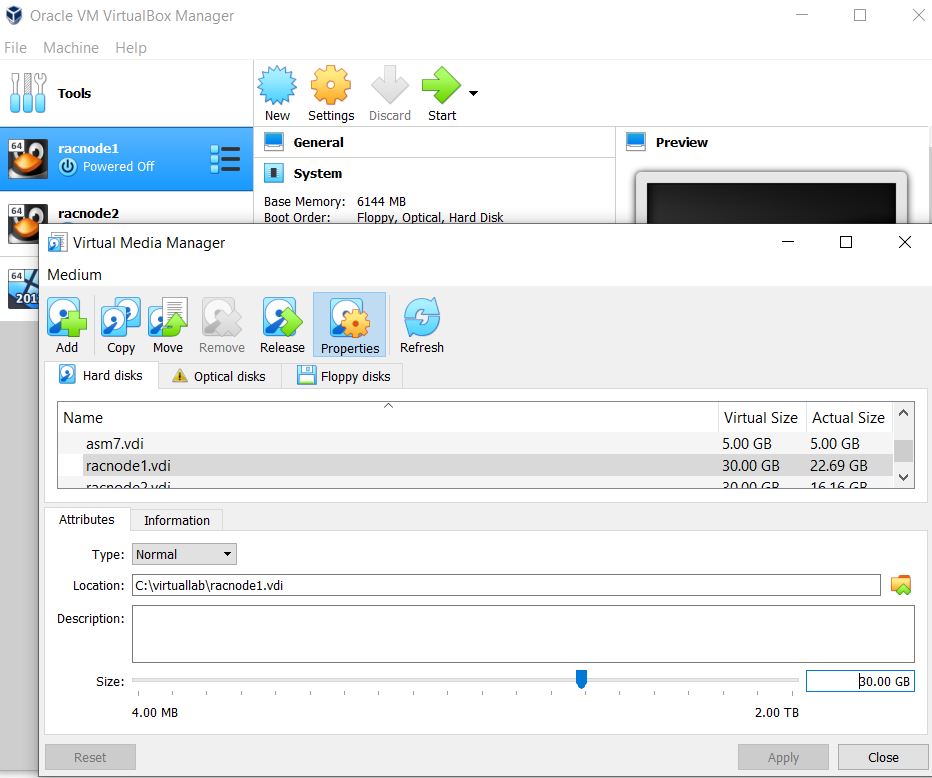
We have two Linux hosts of Oracle RAC in Oracle VirtualBox. Due to space shortage for file systems, there are difficulties for GI/RAC upgrading and patching. we have to extend the virtual hard disk from 30GB to 45GB, then extend the file system size accordingly.
Finally we need add 15GB into root (/) file system.
PV = Physical Volume. When you add a new disk or new partition, you need to designate it as a PV so it can be used by the LVM VG = Volume Group. This is a group of PVs. LV = Logical Volume. This is an abstraction of disk space carved out from a Volume Group (VG) which the OS can then use just as it would a regular hard drive PE = Physical Extents. Think of this like “blocks”. When you do a “vgdisplay” you will see the PE size , the total number of PE’s in the VG and the free PEs available.
Backup virtual hard disk for racnode1 and racnode2, in case the operation fails
Increase Virtualbox Disk Size
Make it from original 30GB to new value 45GB, and reboot the virtual machine.
Identify the partition type
[root@racnode1]# fdisk -l

Disk /dev/sda: 32.2 GB, 32212254720 bytes, 62914560 sectors
Units = sectors of 1 * 512 = 512 bytes
Sector size (logical/physical): 512 bytes / 512 bytes
I/O size (minimum/optimal): 512 bytes / 512 bytes
Disk label type: dos
Disk identifier: 0x000928d8

Device    Boot  Start    End    Blocks  Id   System
/dev/sda1 *      2048  1026047  512000  83    Linux
/dev/sda2     1026048 62914559 30944256 8e Linux LVM
Remember the partition ID is 8e, and System is “Linux LVM”
Check PV information
[root@racnode1]# pvdisplay
--- Physical volume ---
PV Name /dev/sda2
VG Name ol
PV Size 29.51 GiB / not usable 3.00 MiB
Allocatable yes
PE Size 4.00 MiB
Total PE 7554
Free PE 10
Allocated PE 7544
PV UUID ifffmk-GSXU-NcKC-vww1-HMF6-Nc36-A6sewK
Partition the new disk space
[root@racnode1 ~]# fdisk /dev/sda
Welcome to fdisk (util-linux 2.23.2).

Changes will remain in memory only, until you decide to write them.
Be careful before using the write command.

Command (m for help): p

Disk /dev/sda: 48.3 GB, 48318382080 bytes, 94371840 sectors
Units = sectors of 1 * 512 = 512 bytes
Sector size (logical/physical): 512 bytes / 512 bytes
I/O size (minimum/optimal): 512 bytes / 512 bytes
Disk label type: dos
Disk identifier: 0x000928d8

Device Boot Start End Blocks Id System
/dev/sda1 * 2048 1026047 512000 83 Linux
/dev/sda2 1026048 62914559 30944256 8e Linux LVM

Command (m for help): n
Partition type:
p primary (2 primary, 0 extended, 2 free)
e extended
Select (default p): p
Partition number (3,4, default 3):
First sector (62914560-94371839, default 62914560):
Using default value 62914560
Last sector, +sectors or +size{K,M,G} (62914560-94371839, default 94371839):
Using default value 94371839
Partition 3 of type Linux and of size 15 GiB is set

Command (m for help): p

Disk /dev/sda: 48.3 GB, 48318382080 bytes, 94371840 sectors
Units = sectors of 1 * 512 = 512 bytes
Sector size (logical/physical): 512 bytes / 512 bytes
I/O size (minimum/optimal): 512 bytes / 512 bytes
Disk label type: dos
Disk identifier: 0x000928d8

Device Boot Start End Blocks Id System
/dev/sda1 * 2048 1026047 512000 83 Linux
/dev/sda2 1026048 62914559 30944256 8e Linux LVM
/dev/sda3 62914560 94371839 15728640 83 Linux

Command (m for help): m
Command action
   a   toggle a bootable flag
   b   edit bsd disklabel
   c   toggle the dos compatibility flag
   d   delete a partition
   g   create a new empty GPT partition table
   G   create an IRIX (SGI) partition table
   l   list known partition types
   m   print this menu
   n   add a new partition
   o   create a new empty DOS partition table
   p   print the partition table
   q   quit without saving changes
   s   create a new empty Sun disklabel
   t   change a partition's system id
   u   change display/entry units
   v   verify the partition table
   w   write table to disk and exit
   x   extra functionality (experts only)

Command (m for help): t
Partition number (1-3, default 3):
Hex code (type L to list all codes): L

 0  Empty           24  NEC DOS         81  Minix / old Lin bf  Solaris
 1  FAT12           27  Hidden NTFS Win 82  Linux swap / So c1  DRDOS/sec (FAT-
 2  XENIX root      39  Plan 9          83  Linux           c4  DRDOS/sec (FAT-
 3  XENIX usr       3c  PartitionMagic  84  OS/2 hidden C:  c6  DRDOS/sec (FAT-
 4  FAT16 <32M      40  Venix 80286     85  Linux extended  c7  Syrinx
 5  Extended        41  PPC PReP Boot   86  NTFS volume set da  Non-FS data
 6  FAT16           42  SFS             87  NTFS volume set db  CP/M / CTOS / .
 7  HPFS/NTFS/exFAT 4d  QNX4.x          88  Linux plaintext de  Dell Utility
 8  AIX             4e  QNX4.x 2nd part 8e  Linux LVM       df  BootIt
 9  AIX bootable    4f  QNX4.x 3rd part 93  Amoeba          e1  DOS access
 a  OS/2 Boot Manag 50  OnTrack DM      94  Amoeba BBT      e3  DOS R/O
 b  W95 FAT32       51  OnTrack DM6 Aux 9f  BSD/OS          e4  SpeedStor
 c  W95 FAT32 (LBA) 52  CP/M            a0  IBM Thinkpad hi eb  BeOS fs
 e  W95 FAT16 (LBA) 53  OnTrack DM6 Aux a5  FreeBSD         ee  GPT
 f  W95 Ext'd (LBA) 54  OnTrackDM6      a6  OpenBSD         ef  EFI (FAT-12/16/
10  OPUS            55  EZ-Drive        a7  NeXTSTEP        f0  Linux/PA-RISC b
11  Hidden FAT12    56  Golden Bow      a8  Darwin UFS      f1  SpeedStor
12  Compaq diagnost 5c  Priam Edisk     a9  NetBSD          f4  SpeedStor
14  Hidden FAT16 ❤ 61  SpeedStor       ab  Darwin boot     f2  DOS secondary
16  Hidden FAT16    63  GNU HURD or Sys af  HFS / HFS+      fb  VMware VMFS
17  Hidden HPFS/NTF 64  Novell Netware  b7  BSDI fs         fc  VMware VMKCORE
18  AST SmartSleep  65  Novell Netware  b8  BSDI swap       fd  Linux raid auto
1b  Hidden W95 FAT3 70  DiskSecure Mult bb  Boot Wizard hid fe  LANstep
1c  Hidden W95 FAT3 75  PC/IX           be  Solaris boot    ff  BBT
1e  Hidden W95 FAT1 80  Old Minix
Hex code (type L to list all codes): 8e
Changed type of partition 'Linux' to 'Linux LVM'

Command (m for help): p

Disk /dev/sda: 48.3 GB, 48318382080 bytes, 94371840 sectors
Units = sectors of 1 * 512 = 512 bytes
Sector size (logical/physical): 512 bytes / 512 bytes
I/O size (minimum/optimal): 512 bytes / 512 bytes
Disk label type: dos
Disk identifier: 0x000928d8

   Device Boot      Start         End      Blocks   Id  System
/dev/sda1   *        2048     1026047      512000   83  Linux
/dev/sda2         1026048    62914559    30944256   8e  Linux LVM
/dev/sda3        62914560    94371839    15728640   8e  Linux LVM

Command (m for help): w
The partition table has been altered!

Calling ioctl() to re-read partition table.

WARNING: Re-reading the partition table failed with error 16: Device or resource busy.
The kernel still uses the old table. The new table will be used at
the next reboot or after you run partprobe(8) or kpartx(8)
Syncing disks.

[root@racnode1 ~]# reboot
PolicyKit daemon disconnected from the bus.
We are no longer a registered authentication agent.
Check partitions
[root@racnode1 ~]# fdisk -l

Disk /dev/sda: 48.3 GB, 48318382080 bytes, 94371840 sectors
Units = sectors of 1 * 512 = 512 bytes
Sector size (logical/physical): 512 bytes / 512 bytes
I/O size (minimum/optimal): 512 bytes / 512 bytes
Disk label type: dos
Disk identifier: 0x000928d8

Device Boot Start End Blocks Id System
/dev/sda1 * 2048 1026047 512000 83 Linux
/dev/sda2 1026048 62914559 30944256 8e Linux LVM
/dev/sda3 62914560 94371839 15728640 8e Linux LVM
pvcreate to add the new partition as a PV for VG
[root@racnode1 ~]# pvcreate /dev/sda3
WARNING: dos signature detected on /dev/sda3 at offset 510. Wipe it? [y/n]: y
Wiping dos signature on /dev/sda3.
Physical volume "/dev/sda3" successfully created
Check partition type, system, or need reboot the virtual machine if below errors occurred.
[root@racnode1 ~]# pvcreate /dev/sda3
  Device /dev/sda3 not found (or ignored by filtering).
Check PV to make sure new PV added
[root@racnode1 ~]# pvdisplay
--- Physical volume ---
PV Name /dev/sda2
VG Name ol
PV Size 29.51 GiB / not usable 3.00 MiB
Allocatable yes
PE Size 4.00 MiB
Total PE 7554
Free PE 10
Allocated PE 7544
PV UUID ifffmk-GSXU-NcKC-vww1-HMF6-Nc36-A6sewK

"/dev/sda3" is a new physical volume of "15.00 GiB"
--- NEW Physical volume ---
PV Name /dev/sda3
VG Name
PV Size 15.00 GiB
Allocatable NO
PE Size 0
Total PE 0
Free PE 0
Allocated PE 0
PV UUID WGBbzt-fFtD-ecMK-gJyu-RgtJ-9LeR-DKPfJK
Find the VG name details for adding the new PV
[root@racnode1 ~]# vgdisplay
--- Volume group ---
VG Name ol
System ID
Format lvm2
Metadata Areas 1
Metadata Sequence No 3
VG Access read/write
VG Status resizable
MAX LV 0
Cur LV 2
Open LV 2
Max PV 0
Cur PV 1
Act PV 1
VG Size 29.51 GiB
PE Size 4.00 MiB
Total PE 7554
Alloc PE / Size 7544 / 29.47 GiB
Free PE / Size 10 / 40.00 MiB
VG UUID 55lr8l-8d38-GGIX-j0Cm-InKP-Jiyb-refLmt
Add the new PV to the volume group ( ‘ol’)
[root@racnode1 ~]# vgextend ol /dev/sda3
Volume group "ol" successfully extended
[root@racnode1 ~]#
Check the new size of the VG
[root@racnode1 ~]# vgdisplay
--- Volume group ---
VG Name ol
System ID
Format lvm2
Metadata Areas 2
Metadata Sequence No 4
VG Access read/write
VG Status resizable
MAX LV 0
Cur LV 2
Open LV 2
Max PV 0
Cur PV 2
Act PV 2
VG Size 44.50 GiB
PE Size 4.00 MiB
Total PE 11393
Alloc PE / Size 7544 / 29.47 GiB
Free PE / Size 3849 / 15.04 GiB
VG UUID 55lr8l-8d38-GGIX-j0Cm-InKP-Jiyb-refLmt
Which LV to extend ?
here is ‘/dev/ol/root’
[root@racnode1 ~]# lvdisplay
--- Logical volume ---
LV Path /dev/ol/swap
LV Name swap
VG Name ol
LV UUID epJhR9-0sM6-bK6L-qubv-lrJb-0P0X-2Ab5fD
LV Write Access read/write
LV Creation host, time localhost.localdomain, 2015-11-24 00:34:14 +1100
LV Status available
# open 2
LV Size 3.00 GiB
Current LE 768
Segments 1
Allocation inherit
Read ahead sectors auto
- currently set to 8192
Block device 252:1

--- Logical volume ---
LV Path /dev/ol/root
LV Name root
VG Name ol
LV UUID N0D1Hr-FbhE-R7rt-WuUX-9PQU-jVfH-eF5UtL
LV Write Access read/write
LV Creation host, time localhost.localdomain, 2015-11-24 00:34:14 +1100
LV Status available
# open 1
LV Size 26.47 GiB
Current LE 6776
Segments 1
Allocation inherit
Read ahead sectors auto
- currently set to 8192
Block device 252:0
Extend the LV
Make sure +3849 is from ‘vgdisplay” Free PE
...
.
Alloc PE / Size 7544 / 29.47 GiB
Free PE / Size 3849 / 15.04 GiB
...
.
[root@racnode1 ~]# lvextend -l +3849 /dev/ol/root
Size of logical volume ol/root changed from 26.47 GiB (6776 extents) to 41.50 GiB (10625 extents).
Logical volume root successfully resized.
[root@racnode1 ~]#
Shows the new LV size
[root@racnode1 ~]# lvdisplay
--- Logical volume ---
LV Path /dev/ol/swap
LV Name swap
VG Name ol
LV UUID epJhR9-0sM6-bK6L-qubv-lrJb-0P0X-2Ab5fD
LV Write Access read/write
LV Creation host, time localhost.localdomain, 2015-11-24 00:34:14 +1100
LV Status available
# open 2
LV Size 3.00 GiB
Current LE 768
Segments 1
Allocation inherit
Read ahead sectors auto
- currently set to 8192
Block device 252:1

--- Logical volume ---
LV Path /dev/ol/root
LV Name root
VG Name ol
LV UUID N0D1Hr-FbhE-R7rt-WuUX-9PQU-jVfH-eF5UtL
LV Write Access read/write
LV Creation host, time localhost.localdomain, 2015-11-24 00:34:14 +1100
LV Status available
# open 1
LV Size 41.50 GiB
Current LE 10625
Segments 2
Allocation inherit
Read ahead sectors auto
- currently set to 8192
Block device 252:0
Finally extend the file system size
As default, RedHat/CentOS 7 uses xfs_growfs to extend XFS file system. Alternatively using the resize2fs command for ext based file systems.
[root@racnode1 ~]# cat /etc/fstab

#
# /etc/fstab

# Created by anaconda on Mon Nov 23 08:34:14 2015
#
# Accessible filesystems, by reference, are maintained under '/dev/disk'
# See man pages fstab(5), findfs(8), mount(8) and/or blkid(8) for more info
#
/dev/mapper/ol-root / xfs defaults 0 0
UUID=fc21c76e-90ae-4d7f-9b1a-52412af3cf78 /boot xfs defaults 0 0
/dev/mapper/ol-swap swap swap defaults 0 0
tmpfs /dev/shm tmpfs size=2g 0 0
[root@racnode1 ~]#
# df -h To see the current disk usage. # fdisk -l To see the current partitions details. # poweroff Turn the VM off so we can extend the disk on the VM side.
# fdisk -l To see the new disk size on /dev/sda which we just extended, or to see new disks we just presented (/dev/sdb, /dev/sdc, etc.) # fdisk /dev/sda To create new partitions for the OS to use. These new partitions will be added to the VG so we can extend the LV that the “/” partition is on. My newly created partition in the example is /dev/sda3. For new disks you would use /dev/sdb, or /dev/sdc. If you are using an extended /dev/sda like in my case, you will need to reboot for the changes to be seen # fdisk -l To see the new partitions # pvdisplay View current physical volumes a.k.a. pv # pvcreate /dev/sda3 Allow Linux OS to use the new partition in LVM # pvdisplay See the new pv /dev/sda3 # vgdisplay View the current volume groups # vgextend vg_ol /dev/sda3 Add the new PV /dev/sda3 to the existing VG ol # vgdisplay Now you can see the new size of the VG ol. Note the new amount of free PE’s (physical extents) # lvdisplay View the current LV. In this situation, which is the root partition # lvextend -l +2559 /dev/ol/root Now make the LV larger. Growing the LV /dev/ol/root by 3849 PEs # lvdisplay Now you can see the larger size of the LV #xfs_growfs /dev/ol/root or # xfs_growfs /dev/ol/root Online resize of the actual filesystem now on that LV # df -h You can see the new size now using the “df” command
SQL> alter index CDR_IDX1 rebuild parallel 16;

Index altered.

Elapsed: 00:01:26.70

SQL> alter index CDR_IDX2 rebuild parallel 16;

Index altered.

Elapsed: 00:00:42.96

SQL> alter index CDR_IDX3 rebuild parallel 16;

Index altered.

Elapsed: 00:00:41.34

SQL> alter index CDR_IDX4 rebuild parallel 16;

Index altered.

Elapsed: 00:00:47.16


SQL>  alter index CDR_IDX1 parallel 1;

Index altered.

Elapsed: 00:00:00.01
SQL>  alter index CDR_IDX2 parallel 1;

Index altered.

Elapsed: 00:00:00.03
SQL>  alter index CDR_IDX3 parallel 1;

Index altered.

Elapsed: 00:00:00.01
SQL>  alter index CDR_IDX4  parallel 1;

Index altered.

Elapsed: 00:00:00.01
For 12c onward, split a partition into multiple partitions in one statement.
SQL>alter table CDR split partition PAR_2018 into (
partition par_201801 values less than TO_DATE(' 2018-02-01 00:00:00','sYYYY-MM-DD HH24:MI:SS')),
partition par_201802 values less than TO_DATE(' 2019-03-01 00:00:00','sYYYY-MM-DD HH24:MI:SS')),
partition par_201903 values less than TO_DATE(' 2019-04-01 00:00:00','sYYYY-MM-DD HH24:MI:SS')),
...
..
.
partition par_201811 values less than TO_DATE(' 2018-12-01 00:00:00','sYYYY-MM-DD HH24:MI:SS')),
partition par_201812 values less than TO_DATE(' 2019-01-01 00:00:00','sYYYY-MM-DD HH24:MI:SS'))
);



 Make DBA Life Easy