
Blog

How to Shrink Tablespace SYSMGMTDATA in -MGMTDB

Cluster Health Monitor ( CHM) tables could be fragmented in MGMTDB database

In another post Tablespace SYSMGMTDATA Is Full in GIMR Database (-MGMTDB), we introduced how to truncate Cluster Health Monitor ( CHM) tables to get space back, but did not solve the tablespace high water mark( HWM ) problem.

This post demonstrate how to shrink tablespace SYSMGMTDATA online without outage.

Subscribe to get access

Read more of this content when you subscribe today.

SHRINK tablespace SYSMGMTDATA

SYSMGMTDATA tablespace shrinked from 30GB down to 4GB, also give a maximum size to avoid out of space issue.

SQL>alter database datafile '+OCR_VOTE/_MGMTDB/FD9B43BF6A646F8CE043B6A9E80A2815/DATAFILE/sysmgmtdata.269.922884445' autoextend on maxsize 4096m;

Database altered.
Unable to get logical block size for spfile ‘+OCR_VOTE/_mgmtdb/spfile-MGMTDB.ora’

SYMPTOM

In alert log of management DB in GI ( Grid Infrastructure ) environment, there are following errors everyday:

Fri Jul 03 00:54:36 2020
ERROR: Unable to get logical block size for spfile '+OCR_VOTE/_mgmtdb/spfile-MGMTDB.ora'.
Fri Jul 03 00:54:36 2020
ERROR: Unable to get logical block size for spfile '+OCR_VOTE/_mgmtdb/spfile-MGMTDB.ora'.
Fri Jul 03 00:54:36 2020
ERROR: Unable to get logical block size for spfile '+OCR_VOTE/_mgmtdb/spfile-MGMTDB.ora'.
Fri Jul 03 00:54:36 2020
ERROR: Unable to get logical block size for spfile '+OCR_VOTE/_mgmtdb/spfile-MGMTDB.ora'.
Fri Jul 03 00:54:36 2020
ERROR: Unable to get logical block size for spfile '+OCR_VOTE/_mgmtdb/spfile-MGMTDB.ora'.

Subscribe to get access

Read more of this content when you subscribe today.

CertUtil: The system cannot find the file specified

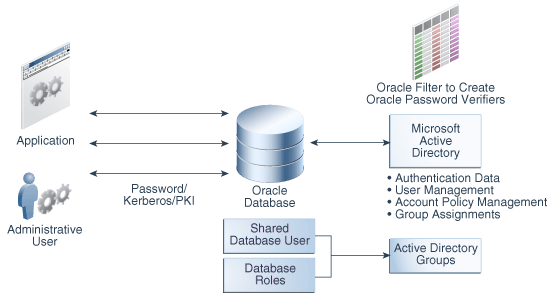
During implementation of Oracle Centrally Managed Users (CMU), the trusted certificate needs to be exported from Active Directory Server, then the following error message occurs :

c:\Windows\System32>certutil -ca.cert root.crt
CertUtil: The system cannot find the file specified.

Subscribe to get access

Read more of this content when you subscribe today.

Now export Certificate again Successfully.

c:\Windows\System32>certutil -ca.cert root.crt
CA cert[0]: 3 -- Valid
CA cert[0]:
-----BEGIN CERTIFICATE-----
MIIDhzCCAm+gAwIBAgIQa3rP+dtgrqFJ/gFo/3hB9jANBgkqhkiG9w0BAQsFADBW
...
..
.
41ZTwYcy4cntPwLHm6kTiWXKCMtYqf0poP5NUxjkiW3pf3IQnej4ZDCqLZ7a2JzJ
J3HbajXZzMaMAI9TyvIhF795EqX+XYgCdjwsbiJ3RD/ObJqwBjJWwTjcJA==
-----END CERTIFICATE-----

CertUtil: -ca.cert command completed successfully.
c:\Windows\System32>

Step by Step Setting Up SQL Server Always On Availability Group

This post demonstrates how to build SQL-Server High Availability feature Always On. All the step by step building procedures make use of Virtual machine, Windows OS, Networks, Active Directory Domain, DNS, Firewall, SQL Server, Clustering, etc.

Contents

Subscribe to get access

Read more of this content when you subscribe today.