Failover Cluster: Event ID 1257 Every 15 Minutes

For a newly created cluster,  there are many Event ID 1257 cluster events shown on Failover Cluster Manager.

Cluster network name resource failed registration of one or more associated
 DNS name(s) because the access to update the secure DNS zone was denied.

cluster Network name: 'Cluster Name'
DNS Zone: 'DNS Zone'

Ensure that cluster name object (CNO) is granted permissions to Secure 
DNS Zone.

Subscribe to get access

Read more of this content when you subscribe today.

Apply Patch 28828733 – GI Jan 2019 Release Update 12.2.0.1.190115

Here is the GI environment to be patched:

GI HOME:  12.2.0.1
DB HOMES: 12.2.0.1

Patches downloaded :

GI HOME: 12.2.0.1 : GI Jan 2019 Release Update 12.2.0.1.190115
Patch NumberDescriptionApplicable Homes
28822515Database Jan 2019 Release Update 12.2.0.1.190115Only DB Home for non-Oracle RAC setup. Both DB Homes and Grid Home for Oracle RAC setup.
28870605OCW Jan 2019 Release Update 12.2.0.1.190115Both DB Homes and Grid Home
28864846ACFS Jan 2019 Release Update 12.2.0.1.190115Only Grid Home
26839277DBWLM Release Update 12.2.0.1.170913Only Grid Home
28566910Tomcat Release Update 12.2.0.1.0Only Grid Home

1) Check and install the latest OPatch utility , which should be greater than 12.2.0.1.12 on all RAC nodes .

[grid@racnode1 ~]$ $ORACLE_HOME/OPatch/opatch version
OPatch Version: 12.2.0.1.18

OPatch succeeded.
[grid@racnode2 ~]$ $ORACLE_HOME/OPatch/opatch version
OPatch Version: 12.2.0.1.18

OPatch succeeded.
[grid@racnode2 ~]$

2) Run OPatch Conflict Check.

First run as GI owner grid user:

[grid@racnode1 trace]$ $ORACLE_HOME/OPatch/opatch prereq CheckConflictAgainstOHWithDetail -phBaseDir /media/sf_Software/12201-190115/28828733/28822515
Oracle Interim Patch Installer version 12.2.0.1.18
Copyright (c) 2020, Oracle Corporation. All rights reserved.

PREREQ session

Oracle Home : /u01/app/12.2.0.1/grid
Central Inventory : /u01/app/oraInventory
from : /u01/app/12.2.0.1/grid/oraInst.loc
OPatch version : 12.2.0.1.18
OUI version : 12.2.0.1.4
Log file location : /u01/app/12.2.0.1/grid/cfgtoollogs/opatch/opatch2020-02-27_21-01-36PM_1.log

Invoking prereq "checkconflictagainstohwithdetail"

Prereq "checkConflictAgainstOHWithDetail" passed.

OPatch succeeded.
[grid@racnode1 trace]$ $ORACLE_HOME/OPatch/opatch prereq CheckConflictAgainstOHWithDetail -phBaseDir /media/sf_Software/12201-190115/28828733/28870605
Oracle Interim Patch Installer version 12.2.0.1.18
Copyright (c) 2020, Oracle Corporation. All rights reserved.

PREREQ session

Oracle Home : /u01/app/12.2.0.1/grid
Central Inventory : /u01/app/oraInventory
from : /u01/app/12.2.0.1/grid/oraInst.loc
OPatch version : 12.2.0.1.18
OUI version : 12.2.0.1.4
Log file location : /u01/app/12.2.0.1/grid/cfgtoollogs/opatch/opatch2020-02-27_21-01-37PM_1.log

Invoking prereq "checkconflictagainstohwithdetail"

Prereq "checkConflictAgainstOHWithDetail" passed.

OPatch succeeded.
[grid@racnode1 trace]$ $ORACLE_HOME/OPatch/opatch prereq CheckConflictAgainstOHWithDetail -phBaseDir /media/sf_Software/12201-190115/28828733/28864846
Oracle Interim Patch Installer version 12.2.0.1.18
Copyright (c) 2020, Oracle Corporation. All rights reserved.

PREREQ session

Oracle Home : /u01/app/12.2.0.1/grid
Central Inventory : /u01/app/oraInventory
from : /u01/app/12.2.0.1/grid/oraInst.loc
OPatch version : 12.2.0.1.18
OUI version : 12.2.0.1.4
Log file location : /u01/app/12.2.0.1/grid/cfgtoollogs/opatch/opatch2020-02-27_21-01-38PM_1.log

Invoking prereq "checkconflictagainstohwithdetail"

Prereq "checkConflictAgainstOHWithDetail" passed.

OPatch succeeded.
[grid@racnode1 trace]$ $ORACLE_HOME/OPatch/opatch prereq CheckConflictAgainstOHWithDetail -phBaseDir /media/sf_Software/12201-190115/28828733/26839277
Oracle Interim Patch Installer version 12.2.0.1.18
Copyright (c) 2020, Oracle Corporation. All rights reserved.

PREREQ session

Oracle Home : /u01/app/12.2.0.1/grid
Central Inventory : /u01/app/oraInventory
from : /u01/app/12.2.0.1/grid/oraInst.loc
OPatch version : 12.2.0.1.18
OUI version : 12.2.0.1.4
Log file location : /u01/app/12.2.0.1/grid/cfgtoollogs/opatch/opatch2020-02-27_21-01-40PM_1.log

Invoking prereq "checkconflictagainstohwithdetail"

Prereq "checkConflictAgainstOHWithDetail" passed.

OPatch succeeded.
[grid@racnode1 trace]$ $ORACLE_HOME/OPatch/opatch prereq CheckConflictAgainstOHWithDetail -phBaseDir /media/sf_Software/12201-190115/28828733/28566910
Oracle Interim Patch Installer version 12.2.0.1.18
Copyright (c) 2020, Oracle Corporation. All rights reserved.

PREREQ session

Oracle Home : /u01/app/12.2.0.1/grid
Central Inventory : /u01/app/oraInventory
from : /u01/app/12.2.0.1/grid/oraInst.loc
OPatch version : 12.2.0.1.18
OUI version : 12.2.0.1.4
Log file location : /u01/app/12.2.0.1/grid/cfgtoollogs/opatch/opatch2020-02-27_21-01-44PM_1.log

Invoking prereq "checkconflictagainstohwithdetail"

Prereq "checkConflictAgainstOHWithDetail" passed.

OPatch succeeded.
[grid@racnode1 trace]$

Second run as Database Home owner user oracle:

[oracle@racnode2 dbhome_1]$ $ORACLE_HOME/OPatch/opatch prereq CheckConflictAgainstOHWithDetail -phBaseDir /media/sf_Software/12201-190115/28828733/28822515
Oracle Interim Patch Installer version 12.2.0.1.18
Copyright (c) 2020, Oracle Corporation.  All rights reserved.

PREREQ session

Oracle Home       : /u01/app/oracle/product/12.2.0/dbhome_1
Central Inventory : /u01/app/oraInventory
   from           : /u01/app/oracle/product/12.2.0/dbhome_1/oraInst.loc
OPatch version    : 12.2.0.1.18
OUI version       : 12.2.0.1.4
Log file location : /u01/app/oracle/product/12.2.0/dbhome_1/cfgtoollogs/opatch/opatch2020-02-27_21-20-54PM_1.log

Invoking prereq "checkconflictagainstohwithdetail"

Prereq "checkConflictAgainstOHWithDetail" passed.

OPatch succeeded.
[oracle@racnode2 dbhome_1]$  $ORACLE_HOME/OPatch/opatch prereq CheckConflictAgainstOHWithDetail -phBaseDir /media/sf_Software/12201-190115/28828733/28870605
Oracle Interim Patch Installer version 12.2.0.1.18
Copyright (c) 2020, Oracle Corporation.  All rights reserved.

PREREQ session

Oracle Home       : /u01/app/oracle/product/12.2.0/dbhome_1
Central Inventory : /u01/app/oraInventory
   from           : /u01/app/oracle/product/12.2.0/dbhome_1/oraInst.loc
OPatch version    : 12.2.0.1.18
OUI version       : 12.2.0.1.4
Log file location : /u01/app/oracle/product/12.2.0/dbhome_1/cfgtoollogs/opatch/opatch2020-02-27_21-21-07PM_1.log

Invoking prereq "checkconflictagainstohwithdetail"

Prereq "checkConflictAgainstOHWithDetail" passed.

OPatch succeeded.
[oracle@racnode2 dbhome_1]$

3)Run OPatch SystemSpace Check:

Check if enough free space is available on the ORACLE_HOME filesystem for the patches to be applied as given below:

  • For Grid Infrastructure Home, as home user grid:
    1. Create file /tmp/patch_list_gihome.txt with the following content:
      % cat /tmp/patch_list_gihome.txt
      
      /media/sf_Software/12201-190115/28828733/28822515
      /media/sf_Software/12201-190115/28828733/28870605
      /media/sf_Software/12201-190115/28828733/28864846
      /media/sf_Software/12201-190115/28828733/26839277
      /media/sf_Software/12201-190115/28828733/28566910
    2. Run the opatch command to check if enough free space is available in the Grid Infrastructure Home:
      [grid@racnode1 ~]$ $ORACLE_HOME/OPatch/opatch prereq CheckSystemSpace -phBaseFile /tmp/patch_list_gihome.txt
      Oracle Interim Patch Installer version 12.2.0.1.18
      Copyright (c) 2020, Oracle Corporation.  All rights reserved.
      
      PREREQ session
      
      Oracle Home       : /u01/app/12.2.0.1/grid
      Central Inventory : /u01/app/oraInventory
         from           : /u01/app/12.2.0.1/grid/oraInst.loc
      OPatch version    : 12.2.0.1.18
      OUI version       : 12.2.0.1.4
      Log file location : /u01/app/12.2.0.1/grid/cfgtoollogs/opatch/opatch2020-02-27_21-26-51PM_1.log
      
      Invoking prereq "checksystemspace"
      
      Prereq "checkSystemSpace" passed.
      
      OPatch succeeded.
      [grid@racnode1 ~]$

      For Database home, as home user oracle:

      1. Create file /tmp/patch_list_dbhome.txt with the following content:
        $ cat /tmp/patch_list_dbhome.txt
        /media/sf_Software/12201-190115/28828733/28822515
        /media/sf_Software/12201-190115/28828733/28870605
        
      2. Run opatch command to check if enough free space is available in the Database Home:
        [oracle@racnode1 ~]$ $ORACLE_HOME/OPatch/opatch prereq CheckSystemSpace -phBaseFile /tmp/patch_list_dbhome.txt
        Oracle Interim Patch Installer version 12.2.0.1.18
        Copyright (c) 2020, Oracle Corporation.  All rights reserved.
        
        PREREQ session
        
        Oracle Home       : /u01/app/oracle/product/12.2.0/dbhome_1
        Central Inventory : /u01/app/oraInventory
           from           : /u01/app/oracle/product/12.2.0/dbhome_1/oraInst.loc
        OPatch version    : 12.2.0.1.18
        OUI version       : 12.2.0.1.4
        Log file location : /u01/app/oracle/product/12.2.0/dbhome_1/cfgtoollogs/opatch/opatch2020-02-27_21-37-53PM_1.log
        
        Invoking prereq "checksystemspace"
        
        Prereq "checkSystemSpace" passed.
        
        OPatch succeeded.
        [oracle@racnode1 ~]$

4) Check for conflicts in both the 12.2.0.1 GI home and the 12.2.0.1 DB homes.

  • In case you are applying the patch, run this command:
    [root@racnode1 ~]# /u01/app/12.2.0.1/grid/OPatch/opatchauto apply /media/sf_Software/12201-190115/28828733 -analyze
    
    OPatchauto session is initiated at Thu Feb 27 21:41:27 2020
    
    System initialization log file is /u01/app/12.2.0.1/grid/cfgtoollogs/opatchautodb/systemconfig2020-02-27_09-41-30PM.log.
    
    Session log file is /u01/app/12.2.0.1/grid/cfgtoollogs/opatchauto/opatchauto2020-02-27_09-42-17PM.log
    The id for this session is GKR6
    
    Executing OPatch prereq operations to verify patch applicability on home /u01/app/12.2.0.1/grid
    
    Executing OPatch prereq operations to verify patch applicability on home /u01/app/oracle/product/12.2.0/dbhome_1
    Patch applicability verified successfully on home /u01/app/oracle/product/12.2.0/dbhome_1
    
    Patch applicability verified successfully on home /u01/app/12.2.0.1/grid
    
    
    Verifying SQL patch applicability on home /u01/app/oracle/product/12.2.0/dbhome_1
    
    Following step failed during analysis:
     /bin/sh -c 'cd /u01/app/oracle/product/12.2.0/dbhome_1; ORACLE_HOME=/u01/app/oracle/product/12.2.0/dbhome_1 ORACLE_SID=RACTESTB1 /u01/app/oracle/product/12.2.0/dbhome_1/OPatch/datapatch -prereq -verbose'
    
    SQL patch applicability verified successfully on home /u01/app/oracle/product/12.2.0/dbhome_1
    
    OPatchAuto successful.
    
    --------------------------------Summary--------------------------------
    
    Analysis for applying patches has completed successfully:
    
    Host:racnode1
    RAC Home:/u01/app/oracle/product/12.2.0/dbhome_1
    Version:12.2.0.1.0
    
    
    ==Following patches were SKIPPED:
    
    Patch: /media/sf_Software/12201-190115/28828733/28864846
    Reason: This patch is not applicable to this specified target type - "rac_database"
    
    Patch: /media/sf_Software/12201-190115/28828733/26839277
    Reason: This patch is not applicable to this specified target type - "rac_database"
    
    Patch: /media/sf_Software/12201-190115/28828733/28566910
    Reason: This patch is not applicable to this specified target type - "rac_database"
    
    
    ==Following patches were SUCCESSFULLY analyzed to be applied:
    
    Patch: /media/sf_Software/12201-190115/28828733/28870605
    Log: /u01/app/oracle/product/12.2.0/dbhome_1/cfgtoollogs/opatchauto/core/opatch/opatch2020-02-27_21-42-30PM_1.log
    
    Patch: /media/sf_Software/12201-190115/28828733/28822515
    Log: /u01/app/oracle/product/12.2.0/dbhome_1/cfgtoollogs/opatchauto/core/opatch/opatch2020-02-27_21-42-30PM_1.log
    
    
    Host:racnode1
    CRS Home:/u01/app/12.2.0.1/grid
    Version:12.2.0.1.0
    
    
    ==Following patches were SUCCESSFULLY analyzed to be applied:
    
    Patch: /media/sf_Software/12201-190115/28828733/28870605
    Log: /u01/app/12.2.0.1/grid/cfgtoollogs/opatchauto/core/opatch/opatch2020-02-27_21-42-30PM_1.log
    
    Patch: /media/sf_Software/12201-190115/28828733/28864846
    Log: /u01/app/12.2.0.1/grid/cfgtoollogs/opatchauto/core/opatch/opatch2020-02-27_21-42-30PM_1.log
    
    Patch: /media/sf_Software/12201-190115/28828733/26839277
    Log: /u01/app/12.2.0.1/grid/cfgtoollogs/opatchauto/core/opatch/opatch2020-02-27_21-42-30PM_1.log
    
    Patch: /media/sf_Software/12201-190115/28828733/28566910
    Log: /u01/app/12.2.0.1/grid/cfgtoollogs/opatchauto/core/opatch/opatch2020-02-27_21-42-30PM_1.log
    
    Patch: /media/sf_Software/12201-190115/28828733/28822515
    Log: /u01/app/12.2.0.1/grid/cfgtoollogs/opatchauto/core/opatch/opatch2020-02-27_21-42-30PM_1.log
    
    Following homes are skipped during patching as patches are not applicable:
    
    /u01/app/oracle/product/12.1.0/dbhome_1
    
    OPatchauto session completed at Thu Feb 27 21:42:41 2020
    Time taken to complete the session 1 minute, 14 seconds
    [root@racnode1 ~]#
  • In case you are rolling back the patch, run this command:
    #GRID_HOME/OPatch/opatchauto rollback <UNZIPPED_PATCH_LOCATION>/28828733 -analyze

5) Patch both 12.2.0.2 GI and 12.2.0.1 DB home by running “opatchauto” as root user.

[root@racnode1 ~]# /u01/app/12.2.0.1/grid/OPatch/opatchauto  \
                apply /media/sf_Software/12201-190115/28828733

6) Please repeat step 1 to 5 on node 2.

opatchauto_log

7)Run “datapatch” or post patch SQL as per instructions, if ‘opatchauto’ is not used.

Check the log :

[oracle@racnode2 22636216]$ pwd
/u01/app/oracle/cfgtoollogs/sqlpatch/28822515/22636216
[oracle@racnode2 22636216]$ ls -ltr
total 4772
-rw-r--r-- 1 oracle oinstall 520670 Feb 27 22:42 28822515_apply_RACTESTB_CDBROOT_2020Feb27_22_40_48.log
-rw-r--r-- 1 oracle oinstall 4358895 Feb 27 22:43 28822515_apply_RACTESTB_PDBSEED_2020Feb27_22_42_13.log
[oracle@racnode2 22636216]$

8) Check the patches applied.

a) Run ‘opatch lsinventory’ against both GI and DB homes.

As GI Home owner grid user:

[grid@racnode1]$ opatch lsinventory

As DB Home owner oracle user:

[oracle@racnode1]$ opatch lsinventory

b) Query database .

SQL> select PATCH_ID, VERSION, ACTION, STATUS, DESCRIPTION 
     from dba_registry_sqlpatch;

PATCH_ID   VERSION  ACTION  STATUS DESCRIPTION
---------- -------- ------ ------- -------------------------------------
28822515   12.2.0.1 APPLY  SUCCESS DATABASE JAN 2019 RELEASE UPDATE 12.2.0.1.190115

CRS-1714: Unable to discover any voting files, retrying discovery in 15 seconds

One of the two RAC nodes failed to startup CRS with following messages in alert log:

2020-02-27 20:17:50.802 [OCSSD(14861)]CRS-1714: Unable to discover 
    any voting files, retrying discovery in 15 seconds; Details at 
(:CSSNM00070:)in /u01/app/grid/diag/crs/racnode1/crs/trace/ocssd.trc

ocssd.trc:

2020-02-27 20:17:50.801 : CSSD:3324163840: clssnmReadDiscoveryProfile: voting file discovery string(/dev/oracleasm/disks)
2020-02-27 20:17:50.801 : CSSD:3324163840: clssnmvDDiscThread: using discovery string /dev/oracleasm/disks for initial discovery
2020-02-27 20:17:50.801 : SKGFD:3324163840: Discovery with str:/dev/oracleasm/disks:
2020-02-27 20:17:50.801 : SKGFD:3324163840: UFS discovery with :/dev/oracleasm/disks:
2020-02-27 20:17:50.801 : SKGFD:3324163840: Execute glob on the string /dev/oracleasm/disks
2020-02-27 20:17:50.801 : SKGFD:3324163840: OSS discovery with :/dev/oracleasm/disks:
2020-02-27 20:17:50.802 : SKGFD:3324163840: Discovery skipping bad asmlib :ASM::
2020-02-27 20:17:50.802 : CSSD:3324163840: clssnmvDiskVerify: Successful discovery of 0 disks
2020-02-27 20:17:50.802 : CSSD:3324163840: clssnmCompleteInitVFDiscovery: Completing initial voting file discovery
2020-02-27 20:17:50.802 : CSSD:3324163840: clssnmvFindInitialConfigs: No voting files found
2020-02-27 20:17:50.802 : CSSD:3324163840: (:CSSNM00070:)clssnmCompleteInitVFDiscovery: Voting file not found. Retrying discovery in 15 seconds
2020-02-27 20:17:51.687 : CSSD:3558553344: clsssc_CLSFAInit_CB: System not ready for CLSFA initialization
2020-02-27 20:17:52.687 : CSSD:3558553344: clsssc_CLSFAInit_CB: System not ready for CLSFA initialization
2020-02-27 20:17:53.687 : CSSD:3558553344: clsssc_CLSFAInit_CB: System not ready for CLSFA initialization
2020-02-27 20:17:54.687 : CSSD:3558553344: clsssc_CLSFAInit_CB: System not ready for CLSFA initialization
2020-02-27 20:17:55.688 : CSSD:3558553344: clsssc_CLSFAInit_CB: System not ready for CLSFA initialization
2020-02-27 20:17:56.688 : CSSD:3558553344: clsssc_CLSFAInit_CB: System not ready for CLSFA initialization
2020-02-27 20:17:57.688 : CSSD:3558553344: clsssc_CLSFAInit_CB: System not ready for CLSFA initialization

Subscribe to get access

Read more of this content when you subscribe today.

Oracle Updates and Revisions Patching Path

RU/RUR Update/Revision

From  release 12.2.0.1, “Release Update” ( RU)  and ” Release Update Revision” ( RUR)  are released, which replace the legacy PSUs and Proactive Bundle ( PB ) Patches.

From release 18 onwards, the terms ‘Update‘ and ‘Revision‘ are used instead of “Release Update” ( RU ) and ” Release Update Revision”( RUR ) in 12.2.0.1.

Oracle release pattern of Updates and Releases

Oracle release pattern of Updates and Releases
Oracle release pattern of Updates and Releases

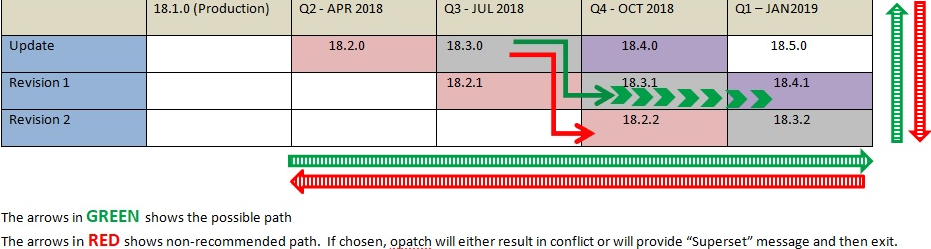
Updates and Revisions Patching Path

Updates and Revisions Patching Path

The patching path is either :

  • Vertically upward
  • Progressive diagonal
  • Progressive straight.

From an Update, the patching direction should be to either its 2 Revisions, released in consecutive quarters, OR the next quarter’s Update. There is no moving backward or vertical down.

If database is at Update 18.3.0 at the moment, the possible patching path could be :

Update 18.3.0  -> Revisions 18.3.1 , 18.3.2, 18.4.1 and so on
                              or
Update 18.3.0 ->  Updates 18.4.0 , 18.5.0 and so on

Below patching path is NOT supported, because backward patching is non-cumulative. There is no moving back to earlier Release’s Updates and Revisions.

Update 18.3.0 -> Revisions 18.2.1 or 18.2.2 OR to Update 18.2.0

If database is at Revision 18.2.2 at the moment, the possible patching path could be :

Revision 18.2.2 -> Revisions 18.3.1 , 18.3.2, 18.4.1 and so on
                    or
Revision 18.2.2 -> Updates 18.4.0 , 18.5.0 and so on.

Below patching path is NOT supported, Because Update 18.3.0 is non-cumulative to 18.2.2.

Revision 18.2.2 -> Revision 18.2.1 or to Update 18.3.0

SQL Database Volume Full due to Volume Shadow Copy Service (VSS)

One data volume with data files is full, but the database whole size is relatively small.  Finally it is because of Volume Shadow Copy Service (VSS),

To check VSS configuration and how much disk space used by VSS :

Disk Management –> Right Click C: Drive, then Properties –>Shadow Copies –> Settings.