How to Use WGET to Download Oracle Binary Software from MOS

Download Oracle software and patches in batch or command line, even in background.

SITUATION

Due to security or firewall issue, we have to download Oracle software and patches from a sever where web browser is unavailable. Here is an example how to download the patches by using wget utility.

IMPLEMENTATION

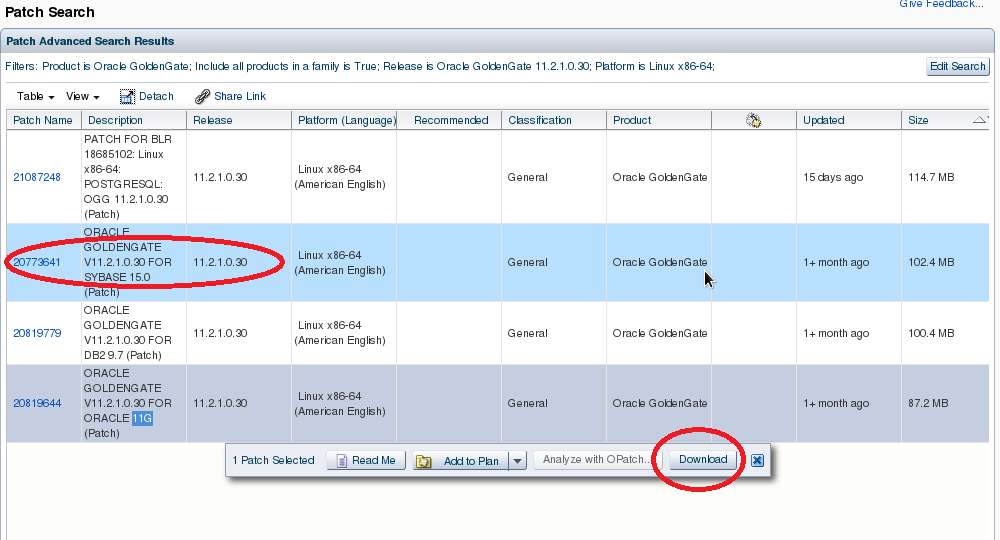
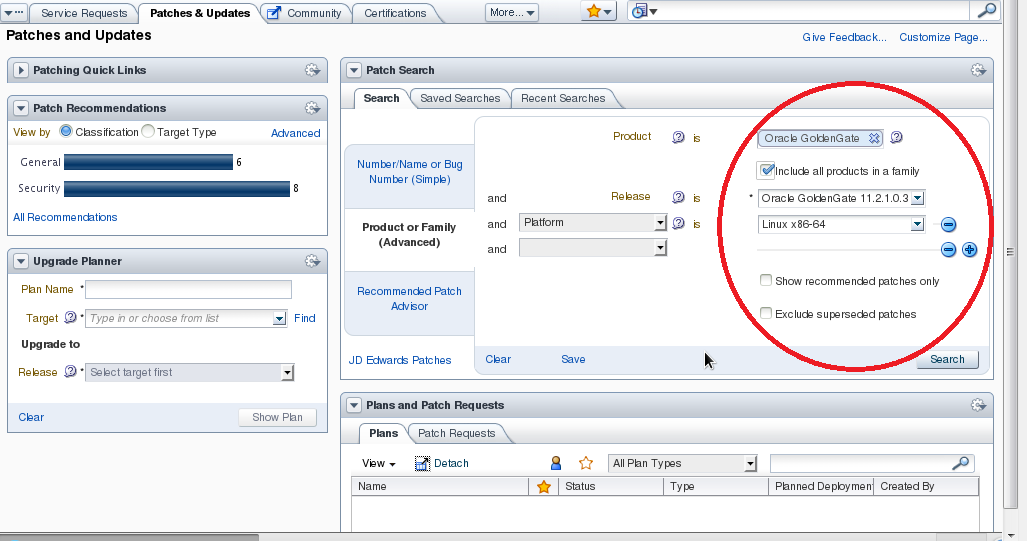
1) Search the patch you want.

patch_update_1

2) Select and click Download button.

patch_update_2

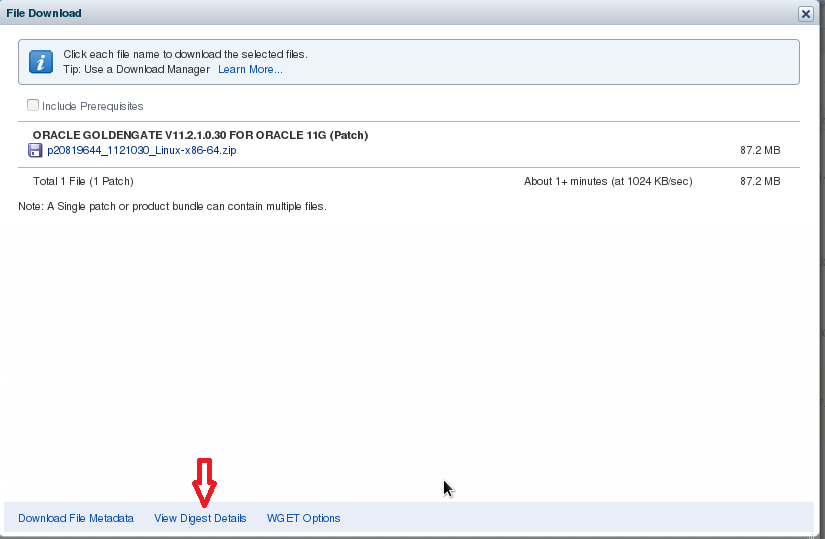
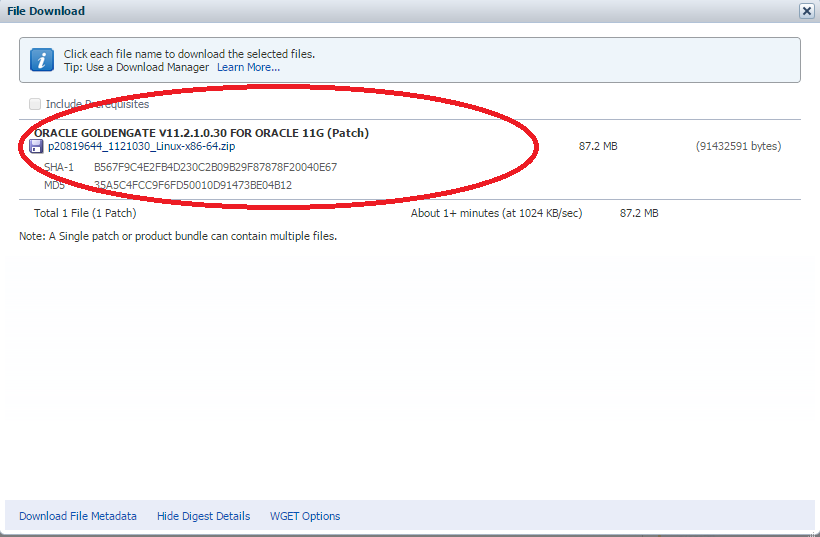
3) Click “View Digest Details

patch_update_3
patch_update_3_1

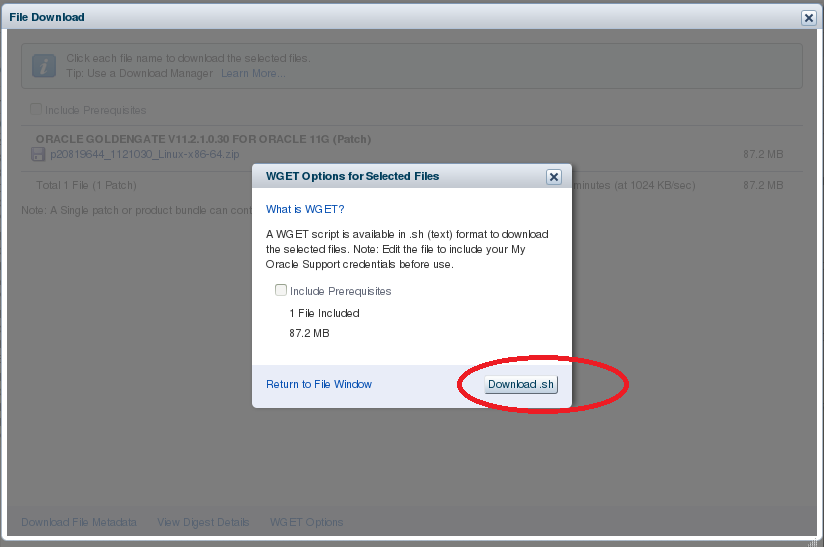
4) Click “WGET Options” and “Download.sh“,  save wget.sh.

patch_update_4

5) Edit wget.sh by specifying the variables with right values as below :

# SSO username and password
SSO_USERNAME=EXAMPLE@ORACLE.COM
SSO_PASSWORD=password
# Path to wget command
WGET="/usr/bin/wget --no-check-certificate --secure-protocol=TLSv1 "
patch_update_5

6) Run wget,sh script.

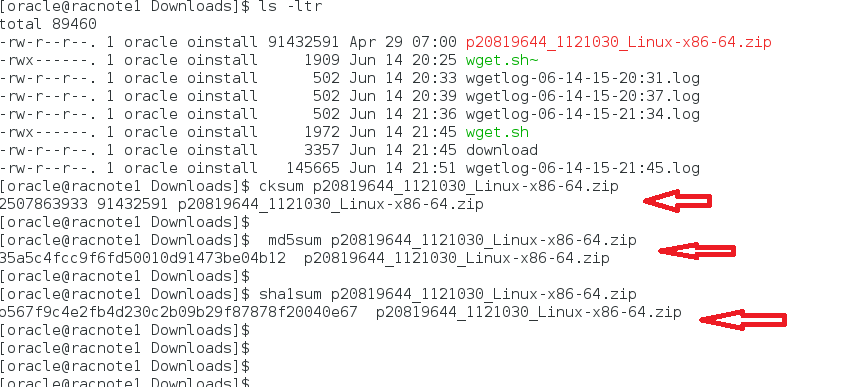
7) Double check the download files are OK by comparing the output string with the values from STEP 3.

patch_update_7

8) wget.sh script content.

#!/bin/sh -x
#
# Generated 6/14/15 10:25 AM
# Start of user configurable variables
#
LANG=C
export LANG
# SSO username and password
SSO_USERNAME=EXAMPLE@ORACLE.COM
SSO_PASSWORD=password
# Path to wget command
WGET="/usr/bin/wget --no-check-certificate --secure-protocol=TLSv1 "
# Location of cookie file
COOKIE_FILE=/tmp/$.cookies
# Log directory and file
LOGDIR=.
LOGFILE=$LOGDIR/wgetlog-`date +%m-%d-%y-%H:%M`.log
# Output directory and file
OUTPUT_DIR=.
#
# End of user configurable variable
#
if [ "$SSO_PASSWORD " = " " ]
then
 echo "Please edit script and set SSO_PASSWORD"
 exit
fi
# Contact updates site so that we can get SSO Params for logging in
SSO_RESPONSE=`$WGET --user-agent="Mozilla/5.0" https://updates.oracle.com/Orion/Services/download 2>&1|grep Location`
# Extract request parameters for SSO
SSO_TOKEN=`echo $SSO_RESPONSE| cut -d '=' -f 2|cut -d ' ' -f 1`
SSO_SERVER=`echo $SSO_RESPONSE| cut -d ' ' -f 2|cut -d 'p' -f 1,2`
SSO_AUTH_URL=sso/auth
AUTH_DATA="ssousername=$SSO_USERNAME&password=$SSO_PASSWORD&site2pstoretoken=$SSO_TOKEN"
# The following command to authenticate uses HTTPS. This will work only if the wget in the environment
# where this script will be executed was compiled with OpenSSL. Remove the --secure-protocol option
# if wget was not compiled with OpenSSL
# Depending on the preference, the other options are --secure-protocol= auto|SSLv2|SSLv3|TLSv1
$WGET --user-agent="Mozilla/5.0" --secure-protocol=TLSv1 --post-data $AUTH_DATA --save-cookies=$COOKIE_FILE --keep-session-cookies $SSO_SERVER$SSO_AUTH_URL -O sso.out >> $LOGFILE 2>&1
rm -f sso.out
$WGET --user-agent="Mozilla/5.0" --load-cookies=$COOKIE_FILE --save-cookies=$COOKIE_FILE --keep-session-cookies "https://updates.oracle.com/Orion/Services/download/p20819644_1121030_Linux-x86-64.zip?aru=18865551&patch_file=p20819644_1121030_Linux-x86-64.zip" -O $OUTPUT_DIR/p20819644_1121030_Linux-x86-64.zip >> $LOGFILE 2>&1
# Cleanup
rm -f $COOKIE_FILE

Apply Database Patch Set Update 12.1.0.2.2 (Includes CPUJan2015) and Oracle JavaVM Component 12.1.0.2.2 Database PSU (Jan2015) onto CDB Database

Oracle suggests to apply the latest PSU as soon as possible.

1) Download and put in place opatch 12.1.0.1.6 as README required.

2)Download patch “p20132434_121020_Linux-x86-64.zip” which includes both database and JVM 12.1.0.2.2 PSU.

3)unzip p20132434_121020_Linux-x86-64.zip.

4) List files.

[oracle@racnode1 20132434]$ ls -ltr
drwxrwx---. 1 root vboxsf 0 Jan 21 01:09 19769480
-rwxrwx---. 1 root vboxsf 25 Jan 21 01:09 README.txt
drwxrwx---. 1 root vboxsf 0 Jan 21 01:09 19877336
-rwxrwx---. 1 root vboxsf 17979 Jan 21 01:18 README.htm

5) Pre-check.

$cd 19769480
$opatch prereq CheckConflictAgainstOHWithDetail -ph ./

 Oracle Interim Patch Installer version 12.1.0.1.6
 Copyright (c) 2015, Oracle Corporation. All rights reserved.
PREREQ session
Oracle Home : /u01/app/oracle/product/12.1.0/dbhome_1
Central Inventory : /u01/app/oraInventory
 from : /u01/app/oracle/product/12.1.0/dbhome_1/oraInst.loc
OPatch version : 12.1.0.1.6
OUI version : 12.1.0.2.0
Log file location : /u01/app/oracle/product/12.1.0/dbhome_1/cfgtoollogs/opatch/opatch2015-03-16_21-05-16PM_1.log
Invoking prereq "checkconflictagainstohwithdetail"
Prereq "checkConflictAgainstOHWithDetail" passed.
OPatch succeeded.

6) Opatch apply.

[oracle@racnote1 19769480]$ opatch apply
Oracle Interim Patch Installer version 12.1.0.1.6
Copyright (c) 2015, Oracle Corporation. All rights reserved.
Oracle Home : /u01/app/oracle/product/12.1.0/dbhome_1
Central Inventory : /u01/app/oraInventory
 from : /u01/app/oracle/product/12.1.0/dbhome_1/oraInst.loc
OPatch version : 12.1.0.1.6
OUI version : 12.1.0.2.0
Log file location : /u01/app/oracle/product/12.1.0/dbhome_1/cfgtollogs/opatch/19769480_Mar_16_2015_21_09_50/apply2015-03-16_21-09-50PM_1.log
Applying interim patch '19769480' to OH '/u01/app/oracle/product/12.1.0/dbhome_1'
Verifying environment and performing prerequisite checks...
All checks passed.
Provide your email address to be informed of security issues, insall and initiate Oracle Configuration Manager. Easier for you if you use your My Oracle Support Email address/User Name.
Visit http://www.oracle.com/support/policies.html for details.
Email address/User Name:
You have not provided an email address for notification of security issues.
Do you wish to remain uninformed of security issues ([Y]es, [N]o) [N]: Y
Please shutdown Oracle instances running out of this ORACLE_HOME on the local system.
(Oracle Home = '/u01/app/oracle/product/12.1.0/dbhome_1')
Is the local system ready for patching? [y|n]y
User Responded with: Y
Backing up files...
Patching component oracle.rdbms.deconfig, 12.1.0.2.0...
Patching component oracle.xdk, 12.1.0.2.0...
Patching component oracle.tfa, 12.1.0.2.0...
Patching component oracle.rdbms.util, 12.1.0.2.0...
Patching component oracle.rdbms, 12.1.0.2.0...
Patching component oracle.rdbms.dbscripts, 12.1.0.2.0...
Patching component oracle.xdk.parser.java, 12.1.0.2.0...
Patching component oracle.oraolap, 12.1.0.2.0...
Patching component oracle.xdk.rsf, 12.1.0.2.0...
Patching component oracle.rdbms.rsf, 12.1.0.2.0...
Patching component oracle.rdbms.rman, 12.1.0.2.0...
Patching component oracle.ldap.rsf, 12.1.0.2.0...
Patching component oracle.ldap.rsf.ic, 12.1.0.2.0...
Verifying the update...
Patch 19769480 successfully applied
Log file location: /u01/app/oracle/product/12.1.0/dbhome_1/cfgtoollogs/opatch/19769480_Mar_16_2015_21_09_50/apply2015-03-16_21-09-50PM_1.log

OPatch succeeded.

7) load modified SQL files into the database.

$sqlplus /nolog
SQL>connect / as sysdba
SQL> startup
$cd $ORACLE_HOME/OPatch
SQL> quit
SQL> alter pluggable database all open;

SQL> SELECT NAME,OPEN_MODE FROM V$PDBS;

NAME        OPEN_MODE
----------- ----------
PDB$SEED    READ ONLY
PDB2        READ WRITE
PDB2_2      READ WRITE
PDB_ORCL2   READ WRITE
PDB1_1      READ WRITE
PDB_SAMLES  READ WRITE

6 rows selected.

[oracle@racnote1 OPatch]$ ./datapatch -verbose
SQL Patching tool version 12.2.0.0.0 on Mon Mar 16 22:01:39 2015
Copyright (c) 2014, Oracle. All rights reserved.

Connecting to database...OK
Note: Datapatch will only apply or rollback SQL fixes for PDBs
 that are in an open state, no patches will be applied to closed PDBs.
 Please refer to Note: Datapatch: Database 12c Post Patch SQL Automation
 (Doc ID 1585822.1)
catcon: ALL catcon-related output will be written to /tmp/sqlpatch_catcon__catcon_8643.lst
catcon: See /tmp/sqlpatch_catcon_*.log files for output generated by scripts
catcon: See /tmp/sqlpatch_catcon__*.lst files for spool files, if any
Bootstrapping registry and package to current versions...done
Determining current state...done

Current state of SQL patches:
Bundle series PSU:
 ID 2 in the binary registry and not installed in any PDB

Adding patches to installation queue and performing prereq checks...
Installation queue:
 For the following PDBs: CDB$ROOT PDB$SEED PDB2 PDB2_2 PDB_ORCL2 PDB1_1 PDB_SAMLES
 Nothing to roll back
 The following patches will be applied:
 19769480 (Database Patch Set Update : 12.1.0.2.2 (19769480))

Installing patches...
Patch installation complete. Total patches installed: 7

Validating logfiles...
Patch 19769480 apply (pdb CDB$ROOT): SUCCESS
 logfile: /u01/app/oracle/cfgtoollogs/sqlpatch/19769480/18350083/19769480_apply_CDB2_CDBROOT_2015Mar16_22_02_28.log (no errors)
Patch 19769480 apply (pdb PDB$SEED): SUCCESS
 logfile: /u01/app/oracle/cfgtoollogs/sqlpatch/19769480/18350083/19769480_apply_CDB2_PDBSEED_2015Mar16_22_02_38.log (no errors)
Patch 19769480 apply (pdb PDB2): SUCCESS
 logfile: /u01/app/oracle/cfgtoollogs/sqlpatch/19769480/18350083/19769480_apply_CDB2_PDB2_2015Mar16_22_02_38.log (no errors)
Patch 19769480 apply (pdb PDB2_2): SUCCESS
 logfile: /u01/app/oracle/cfgtoollogs/sqlpatch/19769480/18350083/19769480_apply_CDB2_PDB2_2_2015Mar16_22_02_38.log (no errors)
Patch 19769480 apply (pdb PDB_ORCL2): SUCCESS
 logfile: /u01/app/oracle/cfgtoollogs/sqlpatch/19769480/18350083/19769480_apply_CDB2_PDB_ORCL2_2015Mar16_22_02_39.log (no errors)
Patch 19769480 apply (pdb PDB1_1): SUCCESS
 logfile: /u01/app/oracle/cfgtoollogs/sqlpatch/19769480/18350083/19769480_apply_CDB2_PDB1_1_2015Mar16_22_02_52.log (no errors)
Patch 19769480 apply (pdb PDB_SAMLES): SUCCESS
 logfile: /u01/app/oracle/cfgtoollogs/sqlpatch/19769480/18350083/19769480_apply_CDB2_PDB_SAMLES_2015Mar16_22_02_51.log (no errors)
SQL Patching tool complete on Mon Mar 16 22:03:00 2015
[oracle@racnote1 OPatch]$ 


SQL> select VERSION,ACTION,STATUS,ACTION_TIME 
       from dba_registry_sqlpatch;

VERSION   ACTION  STATUS   ACTION_TIME
--------- ------- -------- -----------------------------
12.1.0.2  APPLY   SUCCESS  16-MAR-15 10.02.57.755324 PM

 Apply Oracle JavaVM Component 12.1.0.2.2 Database PSU (Jan2015)

1)Pre-check.

[oracle@racnode1 19877336]$ opatch prereq CheckConflictAgainstOHWithDetail -ph ./
Oracle Interim Patch Installer version 12.1.0.1.6
Copyright (c) 2015, Oracle Corporation. All rights reserved.

PREREQ session

Oracle Home : /u01/app/oracle/product/12.1.0/dbhome_1
Central Inventory : /u01/app/oraInventory
from : /u01/app/oracle/product/12.1.0/dbhome_1/oraInst.loc
OPatch version : 12.1.0.1.6
OUI version : 12.1.0.2.0
Log file location : /u01/app/oracle/product/12.1.0/dbhome_1/cfgtoollogs/opatch/opatch2015-03-16_22-08-46PM_1.log

Invoking prereq "checkconflictagainstohwithdetail"

Prereq "checkConflictAgainstOHWithDetail" passed.

OPatch succeeded.

2)  opatch apply.

3)  load modified SQL files into the database.

$sqlplus /nolog
SQL>connect / as sysdba
SQL> startup
$cd $ORACLE_HOME/OPatch
SQL> quit

SQL> alter pluggable database all open;
SQL> SELECT NAME,OPEN_MODE FROM V$PDBS;
NAME         OPEN_MODE
------------ ----------
PDB$SEED     READ ONLY
PDB2         READ WRITE
PDB2_2       READ WRITE
PDB_ORCL2    READ WRITE
PDB1_1       READ WRITE
PDB_SAMLES   READ WRITE

6 rows selected.

[oracle@racnote1 OPatch]$ ./datapatch -verbose

-----------------------------------------------------
There is an error for PDB2 pluggable databbase
-----------------------------------------------------

Patch 19877336 apply (pdb PDB2): WITH ERRORS
 logfile: /u01/app/oracle/cfgtoollogs/sqlpatch/19877336/18313828/19877336_apply_CDB2_PDB2_2015Mar16_22_29_39.log (errors)
 Error at line 554: ORA-01652: unable to extend temp segment by 128 in tablespace TEMP_PDB2
 Error at line 555: ORA-06512: at line 10
----------------------------------------------------
----------------------------------------------------
To fix:
1) make tempfile autoextend on
2) rerun datapatch

SQL> alter session set container=pdb2;
Session altered.

SQL> show con_name
CON_NAME
------------
PDB2

SQL> select PATCH_ID,ACTION,STATUS,ACTION_TIME,DESCRIPTION
       from dba_registry_sqlpatch ;
 
PATCH_ID   ACTION   STATUS    ACTION_TIME                  DESCRIPTION
---------- -------- --------- ---------------------------  --------------
 19769480  APPLY    SUCCESS   16-MAR-15 10.02.58.791011 PM Database Patch Set Update : 12.1.0.2.2 (19769480)
 19877336  APPLY  WITH ERRORS 16-MAR-15 10.42.38.915032 PM Database PSU 12.1.0.2.2, Oracle JavaVM Component (
 19877336  APPLY     SUCCESS  16-MAR-15 11.34.24.408659 PM Database PSU 12.1.0.2.2, Oracle JavaVM Component ( 


SQL> alter session set container=cdb$root;
SQL> select PATCH_ID,ACTION,STATUS,ACTION_TIME,DESCRIPTION 
       from dba_registry_sqlpatch ;

PATCH_ID   ACTION   STATUS  ACTION_TIME                  DESCRIPTION
---------- -------- ------- ---------------------------  -------------

 19769480  APPLY   SUCCESS 16-MAR-15 10.02.57.755324 PM  Database Patch Set Update : 12.1.0.2.2 (19769480)
 19877336  APPLY   SUCCESS 16-MAR-15 10.42.37.649060 PM  Database PSU 12.1.0.2.2, Oracle JavaVM Component (

ORA-00845: MEMORY_TARGET not supported on this system

Make sure Oracle Databases are configured by using ASMM, AMM or HUGE PAGES correctly to avoid performance issues.

SYMPTOM

When start up a database, Database failed to be up with ORA-00845 error.

[oracle@racnode1 ~]$ sqlplus /nolog

SQL*Plus: Release 12.1.0.2.0 Production on Sun Mar 15 21:08:17 2015

Copyright (c) 1982, 2014, Oracle. All rights reserved.

SQL> connect / as sysdba
Connected to an idle instance.

SQL> startup
ORA-00845: MEMORY_TARGET not supported on this system

The alert log has messages as below:

Sun Mar 15 21:08:31 2015
WARNING: You are trying to use the MEMORY_TARGET feature. This feature requires the /dev/shm file system to be mounted for at least 1073741824 bytes. /dev/shm is either not mounted or is mounted with available space less than this size. Please fix this so that MEMORY_TARGET can work as expected. Current available is 659394560 and used is 499130368 bytes. Ensure that the mount point is /dev/shm for this directory.

SOLUTION

Please confirm that ORACLE_HOME is set correctly. This error sometimes happens when ORACLE_HOME is not set correctly.

Make sure that the /dev/shm size is configured large enough, like in:

# mount -t tmpfs shmfs -o size=2g /dev/shm

In this case, the size of the shared memory device is configured to be 2GB.

In order to make the same change persistent across system reboots, add an entry for this to the /etc/fstab mount table:

shmfs /dev/shm tmpfs size=2g 0 0

NOTE:

  1. You should check with your System Administrator what the “best” size for /dev/shm is, based on what has been reported in the alert file.
  2. Also, many best practices now suggest disabling AMM especially in Exa* Engineered boxes that have larger memory capability, and can use Huge / Large pages.
    This is because AMM and Huge / Large pages are mutually exclusive and overall performance will be better using Huge pages.

Apply OCT2014 DB PSU OJVM PSU and JDBC Patch Onto 11.2.0.4 ORACLE_HOME

Always apply the latest patches as soon as possible as Oracle recommended.

There is a requirement to apply Oct 2014 PSU onto 11.2.0.4 ORACLE_HOME.

From Oct 2014 onwards, Oracle JavaVM Component Database PSU is released as part of the Critical Patch Update program.

It consists of two separate patches:

  • One for JDBC clients – applicable to Client, Instant Client, Database and Grid ORACLE_HOMES. This is referred to as “JDBC Patch” .
  • One for Oracle JavaVM component within the Oracle Database – applicable to database ORACLE_HOMEs only. This is referred to as “OJVM PSU” .

The table below shows which Oracle JavaVM Component patches are required in the various ORACLE_HOMEs.

VersionType of HomeOctober 2014January 2015
12.1.0.2Database HomeOJVM PSU (Oct 2014)(or Mitigation Patch)OJVM PSU (Jan 2015)(or Mitigation Patch)
Grid HomeNoneNone
Client / Instant Client HomeNoneNone
12.1.0.1,
11.2.0.4,
11.2.0.3,
11.1.0.7
Database HomeOJVM PSU (Oct 2014)
and JDBC Patch (Oct 2014)(or Mitigation Patch and JDBC Patch)
OJVM PSU (Jan 2015) [includes JDBC fixes](or Mitigation Patch and JDBC Patch)
Grid HomeJDBC Patch (Oct 2014) JDBC Patch (Oct 2014)
Client / Instant Client HomeJDBC Patch (Oct 2014) JDBC Patch (Oct 2014)
Other VersionsDatabase HomeMitigation PatchMitigation Patch

OJVM PSU

  • packaged separately from the Database PSU (or equivalent) as they cannot be installed in a RAC Rolling manner, nor in Standby First manner.
  • Oracle has also released “Combo” patches that bundle the OJVM PSU in the same ZIP file as DB PSU and/or GI PSU for ease of download. The OJVM component in these “Combo” patches is in a separate subdirectory with its own install steps still required. October 2014 “Combo” patches do not include the JDBC Patch.
  • are applicable to all database installations regardless of which patching model is used (DB PSU, GI PSU, Security Patch Update (SPU), Windows Bundle Patch or Database Patch for Exadata)
  • require the database home to be patched to at least October 2014 DB PSU (or equivalent)
  • include binary changes to be applied to each Database ORACLE_HOME, and “post install” steps to be execute on each database running from the ORACLE_HOME
  • from January 2015 onwards: include the JDBC fixes
  • For situations where the latest OJVM PSU cannot be installed immediately there is a “Mitigation Patch” that can be used.

MITIGATION PATCH

For situations where the latest OJVM PSU cannot be installed immediately there is a “Mitigation Patch” that can be used. The “Mitigation Patch” is an interim solution to protect against all currently known (Jan 2015) Oracle JavaVM security vulnerabilities in the database until such time as the OJVM PSU can be installed. It can also be used to protect database versions no longer covered by error correction support.

  • is applicable only to database homes, not client nor Grid homes
  • is only applicable to databases that have JavaVM installed
  • has no dependency on the DB PSU (or equivalent) level
  • can be installed in a RAC Rolling manner
  • is a SQL only patch that needs to be installed and activated in each database, hence it can be installed standby first but it requires SQL steps to be executed to be effective, which cannot be done on a read only standby
  • affects use of Java and Java development in the database
    has been reviewed for January 2015 and provides mitigation against all currently known OJVM vulnerabilities
  • can be downloaded here: Patch:19721304

Applying the Mitigation Patch

1. Download and apply the relevant version of Patch:19721304 to each database ORACLE_HOME
2. Execute the patch post install steps against all databases running from each ORACLE_HOME. See the README supplied with the patch for post install steps relevant to the database version.
3. Check the patch logs for any errors and correct as required
4. Run the following step as a SYSDBA user to DISABLE Java development in the database:
      SQL> exec dbms_java_dev.disable
Temporarily Enabling Creation/Update of Stored Java Objects

If you need to allow the creation/update of stored Java objects, including application of patches that affect stored Java or the Oracle JavaVM:

Connect to the database as a SYSDBA user

SQL> exec dbms_java_dev.enable;

Perform the steps required to create or replace Java objects, apply Java related patches.

SQL> exec dbms_java_dev.disable;

Be sure to end the steps with the call to “dbms_java_dev.disable” in order to protect the database.

Applying an “Oracle JavaVM Component Database PSU” Patch with the Mitigation Patch Already Installed

You must “enable” Java development prior to installing the OJVM PSU patch.

Disconnect users and prevent user access to the databases running from the ORACLE_HOME to be patched

“exec dbms_java_dev.enable;” in each database

Shutdown the databases

Follow the full steps to apply the OJVM PSU patch, including running post install steps against each database

You do not need to “disable” Java development after patching with the latest OJVM PSU patch, unless you wish to do so.

JDBC PATCH

  • JDBC patch is separately from the OJVM PSU and Database PSU (or equivalent) for ease of deployment to client environments
  • are applicable to Client, Instant Client and Grid ORACLE_HOMES The JDBC fixes are also applicable to the Database home regardless of whether Oracle JavaVM is used in a database or not:

For October 2014 the JDBC Patch should also be installed in the Database home.
For January 2015 the OJVM PSU includes the JDBC fixes and so the JDBC patch does not need to be installed in the Database home unless OJVM PSU is not being installed

  • are applicable to all installations regardless of which patching model is used (DB PSU, GI PSU, Security Patch Update (SPU), Windows Bundle Patch or Database Patch for Exadata)
  • have no dependency on OJVM PSU nor Database PSU (or equivalent) patch level
  • can be installed in database server homes in a RAC Rolling manner
  • do not require the database and listeners to be shutdown for patching in non-RAC environments
  • do not require any post install steps be executed against individual databases

 APPLY PATCHES

The Oct 2014 PSU patches include:

1) Patch 19121551 -- Database Patch Set Update 11.2.0.4.4( Includes CPUOCT2014)
2) Patch 19282021 - Oracle JavaVM Component 11.2.0.4.1 Database PSU (Oct2014)
3) Patch 19852360: ORACLE JAVAVM COMPONENT 11.2.0.4.1 DATABASE PSU - GENERIC JDBC PATCH (OCT2014)
  1. Shutdown databases and services on all nodes
  2. Apply DB PSU Patch 19121551, but do NOT run DB PSU post install steps
  3. Apply OJVM PSU Patch 19282021.
  4. October 2014 only for DB versions below 12.1.0.2: Apply the JDBC Patch 19852360
  5. Run post install steps on all DBs in the patched home:
    • For 11.2.0.3 and 11.2.0.4 run the OJVM PSU post install steps followed by the DB PSU  post install steps.
    • For 11.1.0.7 run the OJVM PSU post install steps, then shutdown/restart the database before following the DB PSU (or equivalent) post install steps. [see note-4 below]
  6. Re-start any stopped databases / services running from this ORACLE_HOME.

REFERENCE:

Oracle Recommended Patches — “Oracle JavaVM Component Database PSU” (OJVM PSU) Patches (Doc ID 1929745.1)

How To Format Empty Failing (Index) Pages Marked by DBVERIFY

Formatting empty failing pages to make clean DBVERIFY results.

ISSUE

Following another post “ORA-00600 internal error code arguments [ktbdchk1: bad dscn] after DG switchover”, there is another smaller file number 8 with 22 indexes pages identified by dbverify as failing pages as below:

Total Pages Failing   (Index): 22

Here we are going to demonstrate how to format those failing index pages.

SOLUTION

Identify the index segments and rebuild them online accordingly.

From the dbverify log below and run the query to get index segments owner and names for rebuilding:

itl[20] has higher commit scn(0x0001.ff7137bc) than block scn (0x0001.0651314d)
Page 15795600 failed with check code 6056

SQL>SELECT tablespace_name, segment_type, owner, segment_name
FROM dba_extents
WHERE file_id =8 and 15795600 between block_id AND block_id + blocks-1;

After rebuilt all the impacted indexes and run dbverify and sql query above, all the failing pages(blocks) are returned to freelist queue. They can be verified by query against dba_free_space view as well.

SQL> select name, bytes/1024/1024/1024 from v$datafile where file#=8;

NAME                                          BYTES/1024/1024/1024
--------------------------------------------  --------------------
+DG1/testdb/datafile/users_tbl.583.845563563  188

Create a table to use all free space, big pctfree to speed up inserting to make use of all available free space.

SQL> create table EMPTY( n number ) tablespace users_tbl pctfree 99;

Table created.

To get min/max free block size.

SQL> select TABLESPACE_NAME,FILE_ID,BLOCKS,count(*)
from dba_free_space
where TABLESPACE_NAME='USERS_TBL'
group by TABLESPACE_NAME,FILE_ID,BLOCKS 
order by 2;

TABLESPACE_NAME BLOCKS COUNT(*)
-------------- ------- ----------
USERS_TBL         8       3
USERS_TBL        16       3
USERS_TBL        32       2
USERS_TBL        40       1
USERS_TBL        48       2
.........
..
USERS_TBL     75904       1

21 rows selected.

To get how many times of minimum free space blocks in total available free space.

SQL> select sum(BLOCKS)/8  
       from dba_free_space
      where TABLESPACE_NAME='USERS_TBL';

SUM(BLOCKS)/8
-----------
66944

Turn datafile autoextend off.

SQL> alter database datafile '+DG1/testdb/datafile/USERS_TBL.583.845563563' autoextend off;

Database altered.

Allocate all available free space to table EMPTY with smallest freespace blcoks.

SQL>BEGIN
      for i in 1..66944 loop
        EXECUTE IMMEDIATE 'alter table EMPTY allocate extent ( size 64K) ';
      end loop;
    END;
    /

Insert data into table EMPTY until encountering unable  to allocate space ORA- error.

SQL> Begin
       FOR i IN 1..100000000 loop
         for j IN 1..10000 loop
           Insert into EMPTY VALUES(i+j);
        end loop;
        commit;
      END LOOP;
   END;
  /

Now drop table to release the free space.

SQL> drop table EMPTY;

Table dropped.

Turn datafile autoextend on.

SQL> alter database datafile '+DG1/tetsdb/datafile/users_tbl.583.845563563' autoextend on;

Database altered.

Run DBVEIFY to confirm all pages are all right now with ZERO pages failing.

DBVERIFY - Verification starting : FILE = +DG1/testdb/datafile/users_tbl.583.845563563

DBVERIFY - Verification complete
Total Pages Examined : 26869760
Total Pages Processed (Data) : 4391230
Total Pages Failing (Data) : 0
Total Pages Processed (Index): 682945
Total Pages Failing (Index): 0
Total Pages Processed (Lob) : 20668189
Total Pages Failing (Lob) : 0
Total Pages Processed (Other): 49949
Total Pages Processed (Seg) : 0
Total Pages Failing (Seg) : 0
Total Pages Empty : 1077447
Total Pages Marked Corrupt : 0