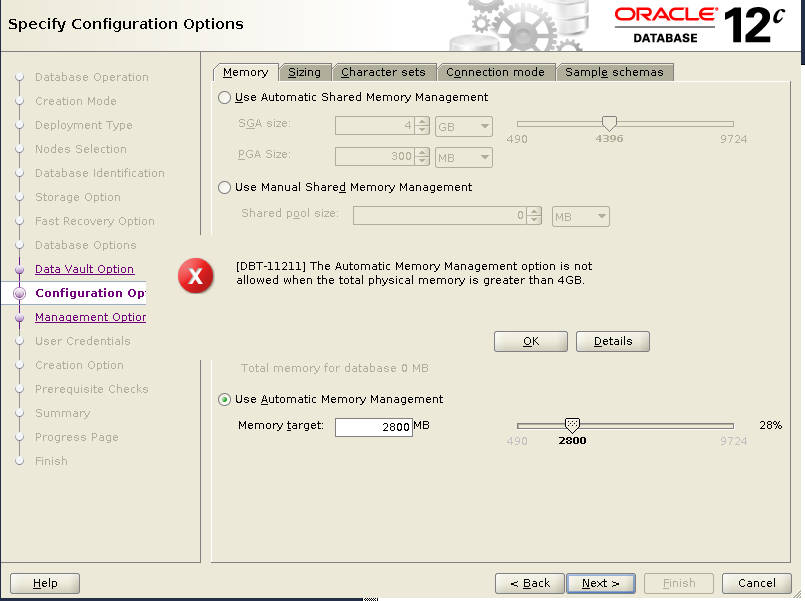
[DBT-11211] The Automatic Memory Management option is not allowed when the total physical memory is greater than 4GB

In 12.2.0.1, when creating a multitenant CDB database by using DBCA, the below error occurs:

[DBT-11211] The Automatic Memory Management option is not allowed
            when the total physical memory is greater than 4GB
DBT-11211
DBT-11211

Workaround

Choose to use ASMM ( Automatic Shared Memory Management ) instead of AMM ( Automatic Memory Management ).

DBCA Memory Option
DBCA Memory Option

How to Exclude Tablespaces from RMAN Backup

You can use “CONFIGURE EXCLUDE FOR TABLESPACE” to exclude tablespaces from RMAN  backup command “BACKUP DATABASE”.

To exclude tablespace TEST_TBS from RMAN backup:

$ rman target / catalog rman/passwd@rman

RMAN>CONFIGURE EXCLUDE FOR TABLESPACE TEST_TBS;

Tablespace TEST_TBS will be excluded from future whole database backups
new RMAN configuration parameters are successfully stored
starting full resync of recovery catalog
full resync complete


RMAN> show exclude ;
RMAN configuration parameters for database with db_unique_name RACTEST are:
CONFIGURE EXCLUDE FOR TABLESPACE 'TEST_TBS';

RMAN>

To exclude PDB tablespace TEST_TBS  from RMAN backup:

RMAN> CONFIGURE EXCLUDE FOR TABLESPACE RACTESTPDB:TEST_TBS;

Tablespace RACTESTPDB:TEST_TBS will be excluded from future whole 
database backups. 
new RMAN configuration parameters are successfully stored. 
starting full resync of recovery catalog
full resync complete

RMAN>show exclude ;
RMAN configuration parameters for database with db_unique_name RACTEST are:
CONFIGURE EXCLUDE FOR TABLESPACE 'TEST_TBS';
CONFIGURE EXCLUDE FOR TABLESPACE 'RACTESTPDB:TEST_TBS';

The following rman backup will excluded the above mentioned tablespaces:

RMAN> BACKUP DATABASE;

The excluded tablespace can be backed up by explicitly specifying them in a BACKUP command or by specifying the NOEXCLUDE option:

RMAN> BACKUP DATABASE NOEXCLUDE;

RMAN> BACKUP TABLESPACE TEST_TBS;

To disable the exclusion for RMAN backups:

RMAN> CONFIGURE EXCLUDE FOR TABLESPACE TEST_TBS CLEAR;

RMAN> CONFIGURE EXCLUDE FOR TABLESPACE RACTESTPDB:TEST_TBS CLEAR;

RMAN> show exclude;


ORA-16857: standby disconnected from redo source for longer than specified threshold

One single 11.2.0.4 instance Oracle database alert log shows below information;

 RFS[1]: No standby redo logfiles available for thread 1

Data Guard shows ORA-16857 error:

DGMGRL> show database "TESTSTY";

Database - TESTSTY

Role: PHYSICAL STANDBY
 Intended State: APPLY-ON
 Transport Lag: 10 minutes 32 seconds (computed 48 seconds ago)
 Apply Lag: 10 minutes 32 seconds (computed 48 seconds ago)
 Apply Rate: 39.97 MByte/s
 Real Time Query: OFF
 Instance(s):
 TESTSTY

Database Warning(s):
 ORA-16857: standby disconnected from redo source for longer than 
specified threshold

Database Status:
WARNING

Checked both primary and standby database, the  standby online redo logs have been created. But the size of the standby online redo logs are different from the database redo logs for both primary and secondary database.

— on standby :

SQL> select GROUP#,THREAD# ,BYTES/1024/1024 from v$standby_log;

GROUP#     THREAD#    BYTES/1024/1024
---------- ---------- ---------------
 4         1           50
 5         1           50
 6         1           50
 7         1           50

SQL> select GROUP#,THREAD#,BYTES/1024/1024 from v$log;

GROUP#     THREAD#    BYTES/1024/1024
---------- ---------- ---------------
 1         1          100
 3         1          100
 2         1          100

— On Primary

SQL> select GROUP#,THREAD# ,BYTES/1024/1024 from v$standby_log;

GROUP#     THREAD#    BYTES/1024/1024
---------- ---------- ---------------
 4         1          50
 5         1          50
 6         1          50
 7         1          50

SQL> select GROUP#,THREAD#,BYTES/1024/1024 from v$log;

GROUP#     THREAD#    BYTES/1024/1024
---------- ---------- ---------------
 1         1          100
 2         1          100
 3         1          100

Drop all standby online redo logs on both primary and standby databases, and recreate them again with same size as redo logfiles.

-- for standby db which is under recovery, recovery needs to be stopped first
SQL>alter database recover managed standby database cancel;

SQL>alter database add standby logfile thread 1 group 4 size 100m;

It will create standby online redo logs for one under +FRA, and another one under from “db_create_file_dest” parameter, if “db_create_online_log_dest_x” are not defined.

Finally restart the recovery process, then everything is fine.

SQL> ALTER DATABASE RECOVER MANAGED STANDBY DATABASE 
THROUGH ALL SWITCHOVER DISCONNECT USING CURRENT LOGFILE;

Database altered.

alert.log:

RFS[1]: Selected log 4 for thread 1 sequence 41436 dbid 1345227970 branch 816878594
Mon Feb 19 14:38:25 2018
..
.
Recovery of Online Redo Log: Thread 1 Group 4 Seq 41436 Reading mem 0
..
.

DGMGRL of DataGuard:

DGMGRL> show database 'TESTSTY';

Database - TESTSTY

Role: PHYSICAL STANDBY
 Intended State: APPLY-ON
 Transport Lag: 0 seconds (computed 0 seconds ago)
 Apply Lag: 0 seconds (computed 0 seconds ago)
 Apply Rate: 208.00 KByte/s
 Real Time Query: OFF
 Instance(s):
 TESTSTY

Database Status:
SUCCESS

How to Remove PDB From Restricted Mode

Run “datapatch” might remove PDB from restricted mode

1) Check PDB  status.

SQL> select INST_ID,NAME,OPEN_MODE,RESTRICTED 
     from gv$pdbs order by 1,2;

INST_ID   NAME        OPEN_MODE  RES
-------- ------------ ---------- ---
 1       RACTESTPDB   READ WRITE YES
 1       PDB$SEED     READ ONLY  NO
 2       RACTESTPDB   READ WRITE YES
 2       PDB$SEED     READ ONLY  NO

2) Check PDB_PLUG_IN_VIOLATIONS.

SQL> select status, message, action 
     from   pdb_plug_in_violations 
     where  status !='RESOLVED';

STATUS      MESSAGE       ACTION
---------   ------------ ------------
PNDING     PSU bundle    Call datapatch.
           patch 180116 
           (DATABASE PATCH
           SET UPDATE
           12.1.0.2.180116):
           Installed in the 
           CDB but not in 
           the PDB.
PENDING     ...
            ..
            .

3) Rerun “datapatch” as per “run datapatch”.

4)Bounce all instances and pdbs.

$srvctl stop database -d RACTEST;

$srvctl start database -d RACTEST;

SQL> alter pluggable database RACTESTPDB open instances=all;

Pluggable database altered.

SQL> select INST_ID,NAME,OPEN_MODE,RESTRICTED
from gv$pdbs order by 1,2;

INST_ID NAME OPEN_MODE RES
-------- ------------ ---------- ---
1 RACTESTPDB READ WRITE NO
1 PDB$SEED READ ONLY NO
2 RACTESTPDB READ WRITE NO
2 PDB$SEED READ ONLY NO

SQL> alter pluggable database RACTESTPDB save state instances=all;

Pluggable database altered.

SQL> select CON_ID,CON_NAME,INSTANCE_NAME,state, restricted from DBA_PDB_SAVED_STATES;

-- make sure PDB' restricted=NO

The pluggable databases that need to be patched must be in upgrade

Normally “datapatch” for OJVM requires database in UPGRADE mode

After applied PSU and OJVM binary patches, and  run “datapatch”,  then get error “The pluggable databases that need to be patched must be in upgrade mode”.

$ ./datapatch -verbose
...
..
.
 The following patches will be rolled back:
 22139226 (Database PSU 12.1.0.2.160119, Oracle JavaVM Component (Jan2016))
 The following patches will be applied:
 27001733 (Database PSU 12.1.0.2.180116, Oracle JavaVM Component (JAN2018))
 26925311 (DATABASE PATCH SET UPDATE 12.1.0.2.180116)

Error: prereq checks failed!
 patch 22139226: The pluggable databases that need to be patched must be in upgrade mode
Prereq check failed, exiting without installing any patches.

...
..
.

The workaround is to add “skip_upgrade_check” option for “datapatch” command:

$ ./datapatch -verbose -skip_upgrade_check
SQL Patching tool version 12.1.0.2.0 Production on Fri Jan 19 17:33:18 2018
Copyright (c) 2012, 2016, Oracle. All rights reserved.

Log file for this invocation: /u01/app/oracle/cfgtoollogs/sqlpatch/sqlpatch_74462_2018_01_19_17_33_18/sqlpatch_invocation.log

Connecting to database...OK
Note: Datapatch will only apply or rollback SQL fixes for PDBs
 that are in an open state, no patches will be applied to closed PDBs.
 Please refer to Note: Datapatch: Database 12c Post Patch SQL Automation
 (Doc ID 1585822.1)
Bootstrapping registry and package to current versions...done
Determining current state...done

Current state of SQL patches:
Patch 22139226 (Database PSU 12.1.0.2.160119, Oracle JavaVM Component (Jan2016)):
 Installed in RACTESTPDB only
Patch 27001733 (Database PSU 12.1.0.2.180116, Oracle JavaVM Component (JAN2018)):
 Installed in the binary registry and CDB$ROOT PDB$SEED
Bundle series PSU:
 ID 180116 in the binary registry and ID 180116 in PDB CDB$ROOT, ID 180116 in PDB PDB$SEED, ID 160419 in PDB RACTESTPDB

Adding patches to installation queue and performing prereq checks...
Installation queue:
 For the following PDBs: CDB$ROOT PDB$SEED
 Nothing to roll back
 Nothing to apply
 For the following PDBs: RACTESTPDB
 The following patches will be rolled back:
 22139226 (Database PSU 12.1.0.2.160119, Oracle JavaVM Component (Jan2016))
 The following patches will be applied:
 27001733 (Database PSU 12.1.0.2.180116, Oracle JavaVM Component (JAN2018))
 26925311 (DATABASE PATCH SET UPDATE 12.1.0.2.180116)

Installing patches...
Patch installation complete. Total patches installed: 3

Validating logfiles...
Patch 22139226 rollback (pdb RACTESTPDB): SUCCESS
 logfile: /u01/app/oracle/cfgtoollogs/sqlpatch/22139226/19729684/22139226_rollback
Patch 27001733 apply (pdb RACTESTPDB): SUCCESS
 logfile: /u01/app/oracle/cfgtoollogs/sqlpatch/27001733/21728084/27001733_apply_LG
Patch 26925311 apply (pdb RACTESTPDB): SUCCESS
 logfile: /u01/app/oracle/cfgtoollogs/sqlpatch/26925311/21850549/26925311_apply_LG
SQL Patching tool complete on Fri Jan 19 17:37:33 2018


SQL> select PATCH_ID,VERSION,ACTION,STATUS,DESCRIPTION 
     from dba_registry_sqlpatch order by ACTION_TIME;
PATCH_ID  VERSION ACTION     STATUS  DESCRIPTION
---------- --------------    ------- --------------- ----------------------------------------------------------------------------------------------------
 22139226 12.1.0.2 APPLY     SUCCESS Database PSU 12.1.0.2.160119, 
                                     Oracle JavaVM Component (Jan2016)
 22291127 12.1.0.2 APPLY     SUCCESS Database Patch Set Update : 
                                     12.1.0.2.160419 (22291127)
 22139226 12.1.0.2 ROLLBACK  SUCCESS Database PSU 12.1.0.2.160119, 
                                     Oracle JavaVM Component (Jan2016)
 27001733 12.1.0.2 APPLY     SUCCESS Database PSU 12.1.0.2.180116, 
                                     Oracle JavaVM Component (JAN2018)
 26925311 12.1.0.2 APPLY     SUCCESS DATABASE PATCH SET UPDATE 
                                     12.1.0.2.180116