Blog

How to Use WGET to Download Oracle Binary Software from MOS

Download Oracle software and patches in batch or command line, even in background.

SITUATION

Due to security or firewall issue, we have to download Oracle software and patches from a sever where web browser is unavailable. Here is an example how to download the patches by using wget utility.

IMPLEMENTATION

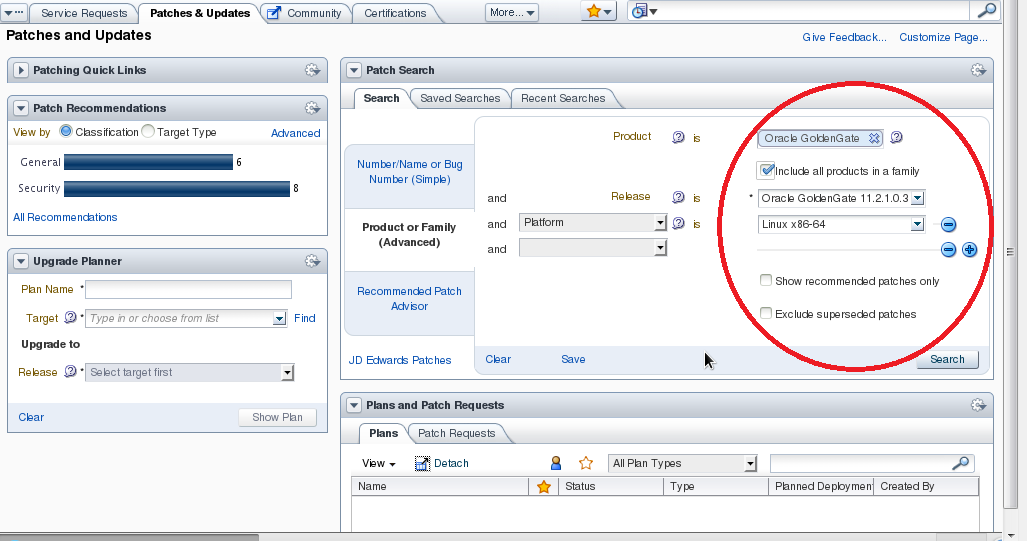
1) Search the patch you want.

patch_update_1

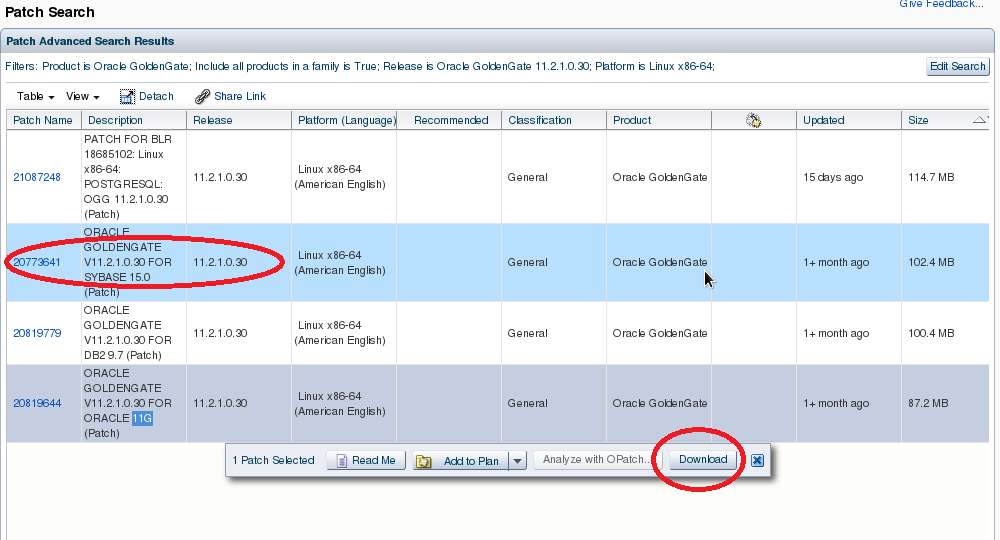
2) Select and click Download button.

patch_update_2

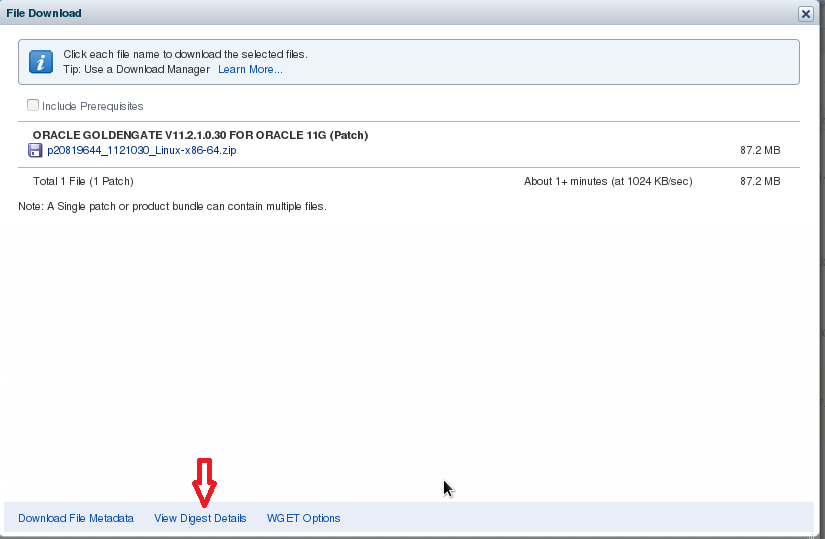
3) Click “View Digest Details

patch_update_3
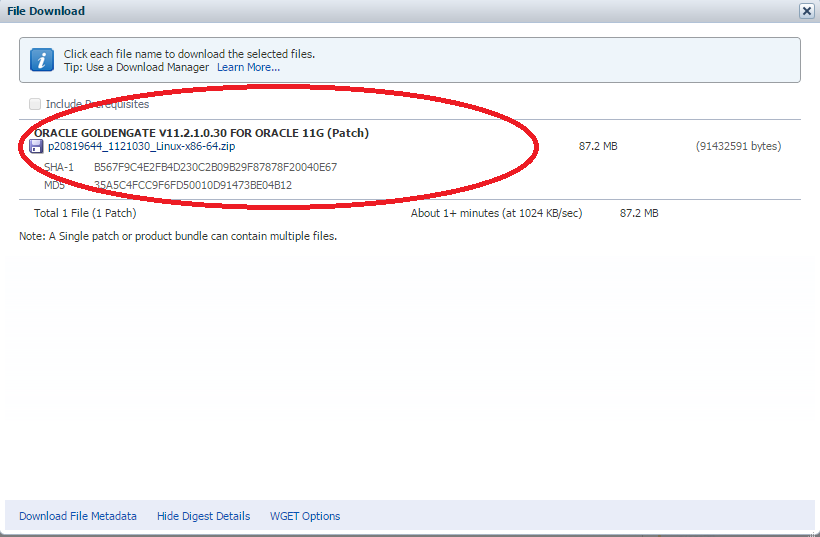
patch_update_3_1

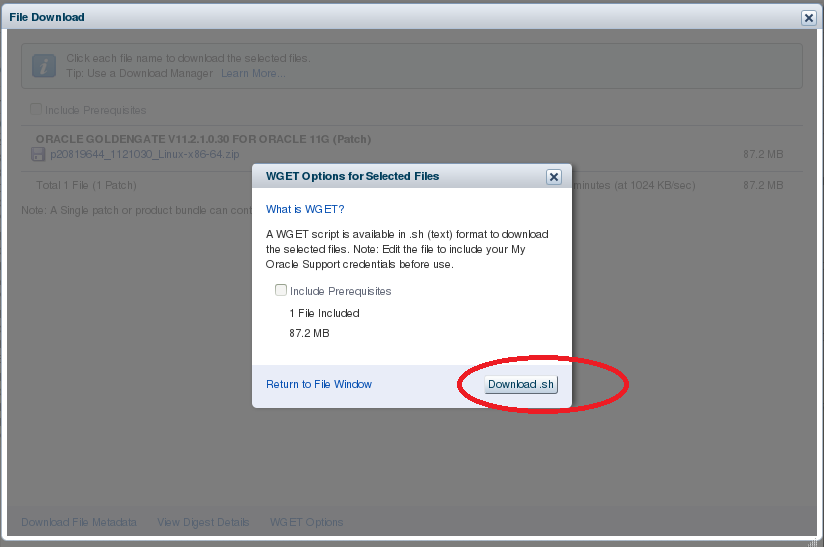
4) Click “WGET Options” and “Download.sh“,  save wget.sh.

patch_update_4

5) Edit wget.sh by specifying the variables with right values as below :

# SSO username and password
SSO_USERNAME=EXAMPLE@ORACLE.COM
SSO_PASSWORD=password
# Path to wget command
WGET="/usr/bin/wget --no-check-certificate --secure-protocol=TLSv1 "
patch_update_5

6) Run wget,sh script.

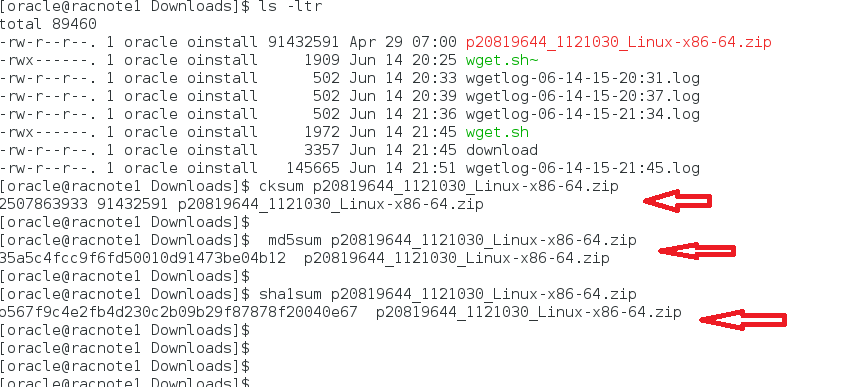
7) Double check the download files are OK by comparing the output string with the values from STEP 3.

patch_update_7

8) wget.sh script content.

#!/bin/sh -x
#
# Generated 6/14/15 10:25 AM
# Start of user configurable variables
#
LANG=C
export LANG
# SSO username and password
SSO_USERNAME=EXAMPLE@ORACLE.COM
SSO_PASSWORD=password
# Path to wget command
WGET="/usr/bin/wget --no-check-certificate --secure-protocol=TLSv1 "
# Location of cookie file
COOKIE_FILE=/tmp/$.cookies
# Log directory and file
LOGDIR=.
LOGFILE=$LOGDIR/wgetlog-`date +%m-%d-%y-%H:%M`.log
# Output directory and file
OUTPUT_DIR=.
#
# End of user configurable variable
#
if [ "$SSO_PASSWORD " = " " ]
then
 echo "Please edit script and set SSO_PASSWORD"
 exit
fi
# Contact updates site so that we can get SSO Params for logging in
SSO_RESPONSE=`$WGET --user-agent="Mozilla/5.0" https://updates.oracle.com/Orion/Services/download 2>&1|grep Location`
# Extract request parameters for SSO
SSO_TOKEN=`echo $SSO_RESPONSE| cut -d '=' -f 2|cut -d ' ' -f 1`
SSO_SERVER=`echo $SSO_RESPONSE| cut -d ' ' -f 2|cut -d 'p' -f 1,2`
SSO_AUTH_URL=sso/auth
AUTH_DATA="ssousername=$SSO_USERNAME&password=$SSO_PASSWORD&site2pstoretoken=$SSO_TOKEN"
# The following command to authenticate uses HTTPS. This will work only if the wget in the environment
# where this script will be executed was compiled with OpenSSL. Remove the --secure-protocol option
# if wget was not compiled with OpenSSL
# Depending on the preference, the other options are --secure-protocol= auto|SSLv2|SSLv3|TLSv1
$WGET --user-agent="Mozilla/5.0" --secure-protocol=TLSv1 --post-data $AUTH_DATA --save-cookies=$COOKIE_FILE --keep-session-cookies $SSO_SERVER$SSO_AUTH_URL -O sso.out >> $LOGFILE 2>&1
rm -f sso.out
$WGET --user-agent="Mozilla/5.0" --load-cookies=$COOKIE_FILE --save-cookies=$COOKIE_FILE --keep-session-cookies "https://updates.oracle.com/Orion/Services/download/p20819644_1121030_Linux-x86-64.zip?aru=18865551&patch_file=p20819644_1121030_Linux-x86-64.zip" -O $OUTPUT_DIR/p20819644_1121030_Linux-x86-64.zip >> $LOGFILE 2>&1
# Cleanup
rm -f $COOKIE_FILE

How to Install rlwrap on Linux

Great utility to arrow UP/DOWN to choose the history commands as in DOS environment.

rlwrap is an utility that allows you to use up and down arrows like in DOS environment. For Oracle commands like sqlplus, rman, adrci, we can do the same as in DOS environment to choose one of the history command instead of type the same command again.

1) Downloand and install as a package from “http://rpm.pbone.net/” or an alternative web sites.

2) Yum install automatically.

[root@racnode1 Patches]# yum install rlwrap-0.42-1.el7.x86_64.rpm
Loaded plugins: langpacks
Examining rlwrap-0.42-1.el7.x86_64.rpm: rlwrap-0.42-1.el7.x86_64
Marking rlwrap-0.42-1.el7.x86_64.rpm to be installed
Resolving Dependencies
--> Running transaction check
---> Package rlwrap.x86_64 0:0.42-1.el7 will be installed
--> Finished Dependency Resolution

Dependencies Resolved

======================================================================================================================================================
 Package Arch Version Repository Size
======================================================================================================================================================
Installing:
 rlwrap x86_64 0.42-1.el7 /rlwrap-0.42-1.el7.x86_64 209 k

Transaction Summary
======================================================================================================================================================
Install 1 Package

Total size: 209 k
Installed size: 209 k
Is this ok [y/d/N]: y
Downloading packages:
Running transaction check
Running transaction test
Transaction test succeeded
Running transaction
 Installing : rlwrap-0.42-1.el7.x86_64 1/1 
 Verifying : rlwrap-0.42-1.el7.x86_64 1/1 

Installed:
 rlwrap.x86_64 0:0.42-1.el7 

Complete!

# which rlwrap
/bin/rlwrap

3) In $HOME/oracle/ .bash_profile, define aliases similar as below to make rlwrap enabled for the commands you want:

# Fo Oracle DB
alias sqlplus=”rlwrap sqlplus”
alias dgmgrl=”rlwrap dgmgrl”
alias rman=”rlwrap rman”
alias lsnrctl=”rlwrap lsnrctl”
alias asmcmd=”rlwrap asmcmd”
alias adrci=”rlwrap adrci”
alias impdp=”rlwrap impdp”
alias expdp=”rlwrap expdp”
# For GoldenGate
alias ggsci='rlwrap ./ggsci'

4) You can use UP/DOWN to choose the history commands as in DOS environment from now on.

Wish you enjoy this new utility for Linux !

How to Install Oracle GoldenGate 12C (12.1.2.1)

Great software to sync Oracle database, schemas, tables and all kinds of transactions in rear time.

1) Download Oracle GoldenGate 12c (12.1.2.1) binaary “121210_fbo_ggs_Linux_x64_shiphome.zip”, and unzip it. One  directory and two files created as below:

$unzip 121210_fbo_ggs_Linux_x64_shiphome.zip
$ ls -ltr
drwxrwx—. 1 root vboxsf 0 Aug 8 2014 fbo_ggs_Linux_x64_shiphome
-rwxrwx—. 1 root vboxsf 1540 Aug 11 2014 OGG-12.1.2.1.0-README.txt
-rwxrwx—. 1 root vboxsf 246718 Aug 11 2014 OGG-12.1.2.1.0-ReleaseNotes.pdf

2)Run runInstaller:

$ cd fbo_ggs_Linux_x64_shiphome
$ cd Disk1
$ ./runInstaller

Capture_1

3) Select the option for Oracle GoldenGate for Oracle Database 12c.
If you select the option for Database 11g, the installation will be valid but will not start against an 11g database due to shared libraries needed (libnnz12.so ).  Support version for Integrated Replicat is Oracle 11g (11.2.0.4).

Capture2

4)Review the Summary screen:

Capture3

5) Start to install with processing details:

Capture4

6)The installation is complete:

Capture5

7) Unlike previous version of Oracle GoldenGate, for 12c OGG installation, the oraInventory is updated accordingly as below:

[oracle@racnode1 ContentsXML]$ cat inventory.xml
<?xml version="1.0" standalone="yes" ?>
<!-- Copyright (c) 1999, 2011, Oracle. All rights reserved. -->
<!-- Do not modify the contents of this file by hand. -->
<INVENTORY>
<VERSION_INFO>
 <SAVED_WITH>11.2.0.3.0</SAVED_WITH>
 <MINIMUM_VER>2.1.0.6.0</MINIMUM_VER>
</VERSION_INFO>
<HOME_LIST>
<HOME NAME="OraDB12Home1" LOC="/u01/app/oracle/product/12.1.0/dbhome_1" TYPE="O" IDX="1"/>
<HOME NAME="OraHome1" LOC="/u01/app/oracle/product/12.1.2/oggcore_1" TYPE="O" IDX="2"/>
</HOME_LIST>
<COMPOSITEHOME_LIST>
</COMPOSITEHOME_LIST>
</INVENTORY>

8) Check Manager process has been stated:

$ . oraenv
ORACLE_SID = [orcl] ? orcl
The Oracle base remains unchanged with value /u01/app/oracle
[oracle@racnode1 oggcore_1]$ cd /u01/app/oracle/product/12.1.2/oggcore_1

$ ./ggsci
Oracle GoldenGate Command Interpreter for Oracle
Version 12.1.2.1.0 OGGCORE_12.1.2.1.0_PLATFORMS_140727.2135.1_FBO
Linux, x64, 64bit (optimized), Oracle 12c on Aug 7 2014 10:21:34
Operating system character set identified as UTF-8.
Copyright (C) 1995, 2014, Oracle and/or its affiliates. All rights reserved.
GGSCI (racnode1) 2> info all
Program Status Group Lag at Chkpt Time Since Chkpt
MANAGER RUNNING
GGSCI (racnode1) 3>

9) Check parameter  file:

$ cd dirprm
$ ls -ltr
total 8
-rwxr-x---. 1 oracle oinstall 103 Aug 7 2014 jagent.prm
-rw-r--r--. 1 oracle oinstall 9 Mar 29 22:48 mgr.prm
$ cat mgr.prm
PORT 7809

10) The 12c installation is simple and straight away,  there is no need to run “CREATE SUBDIRS”, because the OUI does all. It is pretty good.

11) Uninstall Oracle GoldenGate Installation.

cd $OGG_HOME
cd deinstall
./deinstall.sh

Check oraInventory and confirm $OGG_HOME has been removed  from inventory.

$ cat inventory.xml
<?xml version="1.0" standalone="yes" ?>
<!-- Copyright (c) 1999, 2011, Oracle. All rights reserved. -->
<!-- Do not modify the contents of this file by hand. -->
<INVENTORY>
<VERSION_INFO>
 <SAVED_WITH>11.2.0.3.0</SAVED_WITH>
 <MINIMUM_VER>2.1.0.6.0</MINIMUM_VER>
</VERSION_INFO>
<HOME_LIST>
<HOME NAME="OraDB12Home1" LOC="/u01/app/oracle/product/12.1.0/dbhome_1" TYPE="O" IDX="1"/>
</HOME_LIST>
<COMPOSITEHOME_LIST>
</COMPOSITEHOME_LIST>
</INVENTORY>

How to Start MySQL Server

Start up MySQL server .

  1. Run /etc/init.d/mysql script , which is called when system start up or shut down. It calls “mysqld_safe” when start up mysqld server.

Usage: mysql  {start|stop|restart|reload|force-reload|status}  [ MySQL server options ]

# find /etc/ -name *mysql* -exec ls {} -ltr \;
-rw-r--r--. 1 root root 844 Jan 30 00:55 /etc/logrotate.d/mysql
-rw-r--r--. 1 root root 2135 Jan 29 2014 /etc/pki/rpm-gpg/RPM-GPG-KEY-mysql
-rwxr-xr-x. 1 root root 10880 Mar 24 16:37 /etc/rc.d/init.d/mysql.server
-rwxr-xr-x. 1 root root 10815 Jan 30 00:55 /etc/rc.d/init.d/mysql
lrwxrwxrwx. 1 root root 15 Mar 24 23:31 /etc/rc.d/rc0.d/K36mysql -> ../init.d/mysql
lrwxrwxrwx. 1 root root 15 Mar 24 23:31 /etc/rc.d/rc1.d/K36mysql -> ../init.d/mysql
lrwxrwxrwx. 1 root root 15 Mar 24 23:31 /etc/rc.d/rc2.d/S64mysql -> ../init.d/mysql
lrwxrwxrwx. 1 root root 15 Mar 24 23:31 /etc/rc.d/rc3.d/S64mysql -> ../init.d/mysql
lrwxrwxrwx. 1 root root 15 Mar 24 23:31 /etc/rc.d/rc4.d/S64mysql -> ../init.d/mysql
lrwxrwxrwx. 1 root root 15 Mar 24 23:31 /etc/rc.d/rc5.d/S64mysql -> ../init.d/mysql
lrwxrwxrwx. 1 root root 15 Mar 24 23:31 /etc/rc.d/rc6.d/K36mysql -> ../init.d/mysql
-rw-r--r--. 1 root root 10168 Mar 1 04:18 /etc/selinux/targeted/modules/active/modules/mysql.pp
-rw-r--r--. 1 root root 10168 Mar 1 04:47 /etc/selinux/targeted/modules/tmp/modules/mysql.pp
-rw-r--r--. 1 root root 1060 Jan 29 2014 /etc/yum.repos.d/mysql-community-source.repo
-rw-r--r--. 1 root root 1209 Mar 24 14:43 /etc/yum.repos.d/mysql-community.repo

2) Run /etc/init.d/mysql.server, which is same as /etc/init.d/mysql. Check and adjust the hard coded directories.

3) run “bin/mysqld_safe –user=mysql &”

#bin/mysqld_safe --user=mysql &"

MySQL server be run using an unprivileged (non-root) login account. To ensure this if you run mysqld_safe as root, include the –user option as shown. Otherwise, execute the program while logged in as mysql, in which case you can omit the –user option from the command.

 4) Run mysqld directly.

# /sbin/mysqld  --user=mysql &

5) Run service.

# service mysqld start|stop|status

How to Install MySQL on Linux Using RPM Packages

Install MySQL with another different way.

1) Download RPM packages zip file “V74391-01.zip” for MySQL 5.6.23 with files below:

MySQL RMP packages

2) unpack the zip file.

# unzip V74391-01.zip
Archive: V74391-01.zip
 extracting: MySQL-shared-advanced-5.6.23-1.el7.x86_64.rpm 
 extracting: MySQL-test-advanced-5.6.23-1.el7.x86_64.rpm 
 extracting: MySQL-devel-advanced-5.6.23-1.el7.x86_64.rpm 
 extracting: MySQL-shared-compat-advanced-5.6.23-1.el7.x86_64.rpm 
 extracting: MySQL-embedded-advanced-5.6.23-1.el7.x86_64.rpm 
 extracting: MySQL-server-advanced-5.6.23-1.el7.x86_64.rpm 
 extracting: MySQL-client-advanced-5.6.23-1.el7.x86_64.rpm 
 extracting: README.txt

3)To perform a standard minimal installation, install the server and client RPMs:

#rpm -i MySQL-server-advanced-5.6.23-1.el7.x86_64.rpm
#rpm -i MySQL-client-advanced-5.6.23-1.el7.x86_64.rpm

4) Or to install packages using yum. In a directory containing all RPM packages for a MySQL release, “yum install MySQL*rpm” installs them in the correct order.

 [root@racnode1 MySQL_5_6_23_RPMS]# yum install MySQL*rpm
Loaded plugins: langpacks
Examining MySQL-client-advanced-5.6.23-1.el7.x86_64.rpm: MySQL-client-advanced-5.6.23-1.el7.x86_64
Marking MySQL-client-advanced-5.6.23-1.el7.x86_64.rpm to be installed
Examining MySQL-devel-advanced-5.6.23-1.el7.x86_64.rpm: MySQL-devel-advanced-5.6.23-1.el7.x86_64
Marking MySQL-devel-advanced-5.6.23-1.el7.x86_64.rpm to be installed
Examining MySQL-embedded-advanced-5.6.23-1.el7.x86_64.rpm: MySQL-embedded-advanced-5.6.23-1.el7.x86_64
Marking MySQL-embedded-advanced-5.6.23-1.el7.x86_64.rpm to be installed
Examining MySQL-server-advanced-5.6.23-1.el7.x86_64.rpm: MySQL-server-advanced-5.6.23-1.el7.x86_64
Marking MySQL-server-advanced-5.6.23-1.el7.x86_64.rpm to be installed
Examining MySQL-shared-advanced-5.6.23-1.el7.x86_64.rpm: MySQL-shared-advanced-5.6.23-1.el7.x86_64
Marking MySQL-shared-advanced-5.6.23-1.el7.x86_64.rpm to be installed
Examining MySQL-shared-compat-advanced-5.6.23-1.el7.x86_64.rpm: MySQL-shared-compat-advanced-5.6.23-1.el7.x86_64
Marking MySQL-shared-compat-advanced-5.6.23-1.el7.x86_64.rpm to be installed
Examining MySQL-test-advanced-5.6.23-1.el7.x86_64.rpm: MySQL-test-advanced-5.6.23-1.el7.x86_64
Marking MySQL-test-advanced-5.6.23-1.el7.x86_64.rpm to be installed
Resolving Dependencies
--> Running transaction check
---> Package MySQL-client-advanced.x86_64 0:5.6.23-1.el7 will be installed
---> Package MySQL-devel-advanced.x86_64 0:5.6.23-1.el7 will be installed
---> Package MySQL-embedded-advanced.x86_64 0:5.6.23-1.el7 will be installed
---> Package MySQL-server-advanced.x86_64 0:5.6.23-1.el7 will be installed
---> Package MySQL-shared-advanced.x86_64 0:5.6.23-1.el7 will be installed
---> Package MySQL-shared-compat-advanced.x86_64 0:5.6.23-1.el7 will be installed
---> Package MySQL-test-advanced.x86_64 0:5.6.23-1.el7 will be installed
--> Finished Dependency Resolution
http://linuxdownload.adobe.com/linux/x86_64/repodata/repomd.xml: [Errno 14] curl#6 - "Could not resolve host: linuxdownload.adobe.com; Unknown error"
Trying other mirror.
http://public-yum.oracle.com/repo/OracleLinux/OL7/UEKR3/x86_64/repodata/repomd.xml: [Errno 14] curl#6 - "Could not resolve host: public-yum.oracle.com; Unknown error"
Trying other mirror.
http://public-yum.oracle.com/repo/OracleLinux/OL7/latest/x86_64/repodata/repomd.xml: [Errno 14] curl#6 - "Could not resolve host: public-yum.oracle.com; Unknown error"
Trying other mirror.

Dependencies Resolved

======================================================================================================================================================
 Package Arch Version Repository Size
======================================================================================================================================================
Installing:
 MySQL-client-advanced x86_64 5.6.23-1.el7 /MySQL-client-advanced-5.6.23-1.el7.x86_64 74 M
 MySQL-devel-advanced x86_64 5.6.23-1.el7 /MySQL-devel-advanced-5.6.23-1.el7.x86_64 17 M
 MySQL-embedded-advanced x86_64 5.6.23-1.el7 /MySQL-embedded-advanced-5.6.23-1.el7.x86_64 485 M
 MySQL-server-advanced x86_64 5.6.23-1.el7 /MySQL-server-advanced-5.6.23-1.el7.x86_64 264 M
 MySQL-shared-advanced x86_64 5.6.23-1.el7 /MySQL-shared-advanced-5.6.23-1.el7.x86_64 8.1 M
 MySQL-shared-compat-advanced x86_64 5.6.23-1.el7 /MySQL-shared-compat-advanced-5.6.23-1.el7.x86_64 11 M
 MySQL-test-advanced x86_64 5.6.23-1.el7 /MySQL-test-advanced-5.6.23-1.el7.x86_64 342 M

Transaction Summary
======================================================================================================================================================
Install 7 Packages

Total size: 1.2 G
Installed size: 1.2 G
Is this ok [y/d/N]: y
Downloading packages:
Running transaction check
Running transaction test
Transaction test succeeded
Running transaction
 Installing : MySQL-client-advanced-5.6.23-1.el7.x86_64 1/7 
 Installing : MySQL-devel-advanced-5.6.23-1.el7.x86_64 2/7 
 Installing : MySQL-embedded-advanced-5.6.23-1.el7.x86_64 3/7 
 Installing : MySQL-test-advanced-5.6.23-1.el7.x86_64 4/7 
 Installing : MySQL-server-advanced-5.6.23-1.el7.x86_64 5/7 
 Installing : MySQL-shared-advanced-5.6.23-1.el7.x86_64 6/7 
 Installing : MySQL-shared-compat-advanced-5.6.23-1.el7.x86_64 7/7 
 Verifying : MySQL-embedded-advanced-5.6.23-1.el7.x86_64 1/7 
 Verifying : MySQL-shared-compat-advanced-5.6.23-1.el7.x86_64 2/7 
 Verifying : MySQL-devel-advanced-5.6.23-1.el7.x86_64 3/7 
 Verifying : MySQL-shared-advanced-5.6.23-1.el7.x86_64 4/7 
 Verifying : MySQL-test-advanced-5.6.23-1.el7.x86_64 5/7 
 Verifying : MySQL-server-advanced-5.6.23-1.el7.x86_64 6/7 
 Verifying : MySQL-client-advanced-5.6.23-1.el7.x86_64 7/7 

Installed:
 MySQL-client-advanced.x86_64 0:5.6.23-1.el7 MySQL-devel-advanced.x86_64 0:5.6.23-1.el7 MySQL-embedded-advanced.x86_64 0:5.6.23-1.el7 
 MySQL-server-advanced.x86_64 0:5.6.23-1.el7 MySQL-shared-advanced.x86_64 0:5.6.23-1.el7 MySQL-shared-compat-advanced.x86_64 0:5.6.23-1.el7 
 MySQL-test-advanced.x86_64 0:5.6.23-1.el7 

Complete!

5) Check installed MySQL packages:

[root@racnode1 MySQL_5_6_23_RPMS]# rpm -qa |grep -i mysql
MySQL-client-advanced-5.6.23-1.el7.x86_64
MySQL-test-advanced-5.6.23-1.el7.x86_64
MySQL-shared-compat-advanced-5.6.23-1.el7.x86_64
MySQL-server-advanced-5.6.23-1.el7.x86_64
MySQL-embedded-advanced-5.6.23-1.el7.x86_64
MySQL-shared-advanced-5.6.23-1.el7.x86_64
mysql-community-release-el7-5.noarch
MySQL-devel-advanced-5.6.23-1.el7.x86_64

6) Installation Layout for Linux RPM Packages.


<table border="1" summary="MySQL Installation Layout for Linux RPM Packages from the MySQL

Developer Zone”> Directory Contents of Directory /usr/bin Client programs and scripts /usr/sbin The mysqld server /var/lib/mysql Log files, databases /usr/share/info MySQL manual in Info format /usr/share/man Unix manual pages /usr/include/mysql Include (header) files /usr/lib/mysql Libraries /usr/share/mysql Miscellaneous support files, including error messages, character set files, sample configuration files, SQL for database installation /usr/share/sql-bench Benchmarks