Client Side Load Balancing for Oracle RAC

How to make sure Oracle RAC client side load balancing is critical for Oracle RAC performance.

Client side load balancing balances the connection requests across the RAC instances. Set via LOAD_BALANCE parameter in the the net service name within a TNSNAMES.ORA file, it is just a random selection of the addresses in the address_list section of the net service name.

When clients connect using SCAN, Oracle Net automatically load balances client connection requests across the three IP addresses you defined for the SCAN, unless you are using EZConnect.

The tests are held under the following environment, we use both 11gR2 client and 10gR2 clients for testing the behaviors of client side load balancing by using SCAN and non-SCAN hostname.

                     GI: 12.1.0.2.0
4 nodes RAC:  11.2.0.4
Oracle Client: 11.2.0.4 and 10.2.0.5

This shell script is used to create multiple concurrent sessions to simulate database connections from clients.

$ cat create_multi_sessions.sh
#!/bin/bash
for ((i=1; i <= 40 ; i++))
do
nohup sqlplus -S testuser/password@RACTEST << EOT &
begin
    dbms_lock.sleep(20);
end;
/
EOT
done

The service name is RAC_TEST running on node1 and node4, while available nodes are node2 and node3.

$srvctl status service -s RAC_TEST -d TESTDB
Service RAC_TEST is running on instance(s) TESTDB1,TESTDB4
  • By using VIPs without “LOAD_BALANCE=ON”,  get same results from both 11gR2 and 10gR2 client. All connections go to first node where service RAC_TEST is running on.
 RACTEST_VIP =
 (DESCRIPTION =
 (ADDRESS = (PROTOCOL = TCP)(HOST =node1-vip)(PORT = 1521))
 (ADDRESS = (PROTOCOL = TCP)(HOST =node2-vip)(PORT = 1521))
 (ADDRESS = (PROTOCOL = TCP)(HOST =node3-vip)(PORT = 1521))
 (ADDRESS = (PROTOCOL = TCP)(HOST =node4-vip)(PORT = 1521))
 (CONNECT_DATA =
 (SERVICE_NAME = RAC_TEST)
 )
 )
SQL>select inst_id, username, count(*) 
      from gv$session 
     where username='TESTUSER' 
  group by inst_id, username;

INST_ID  USERNAME  COUNT(*)
-------- --------- --------
1        TESTUSER  40
  • By using VIPs adding “LOAD_BALANCE=ON”,  get same results from both 11gR2 and 10gR2 client. All connections are balanced on two nodes where service RAC_TEST are running on.
 RACTEST_VIP =
 (DESCRIPTION = ( LOAD_BALANE = ON )
 (ADDRESS = (PROTOCOL = TCP)(HOST =node1-vip)(PORT = 1521))
 (ADDRESS = (PROTOCOL = TCP)(HOST =node2-vip)(PORT = 1521))
 (ADDRESS = (PROTOCOL = TCP)(HOST =node3-vip)(PORT = 1521))
 (ADDRESS = (PROTOCOL = TCP)(HOST =node4-vip)(PORT = 1521))
 (CONNECT_DATA =
 (SERVICE_NAME = RAC_TEST)
 )
 )

SQL>select inst_id, username, count(*) 
      from gv$session 
     where username='TESTUSER' 
   group by inst_id, username;

INST_ID    USERNAME    COUNT(*)
---------- ---------- ---------
1           TESTUSER        20
4           TESTUSER        20
  • By using SCAN or SCAN IPs with or without “LOAD_BALANCE=ON”, get same results from both 11gR2 and 10gR2 client. All connections are balanced on two nodes where service RAC_TEST are running on.
RACTEST_SCAN =
 (DESCRIPTION =
 (ADDRESS = (PROTOCOL = TCP)(HOST =clu-scan)(PORT = 1521))
 (CONNECT_DATA =
 (SERVICE_NAME = RAC_TEST)
 )
 )

RACTEST_SCAN_IP =
 (DESCRIPTION =
 (ADDRESS = (PROTOCOL = TCP)(HOST =10.10.10.80)(PORT = 1521))
 (ADDRESS = (PROTOCOL = TCP)(HOST =10.10.10.81)(PORT = 1521))
 (ADDRESS = (PROTOCOL = TCP)(HOST =10.10.10.82)(PORT = 1521))
 (CONNECT_DATA =
 (SERVICE_NAME = RAC_TEST)
 )
 )


 INST_ID    USERNAME   COUNT(*)
 ---------- ---------- ---------
 1          TETSUSER   20
 4          TESTUSER   20

From the test, we can see the connections are always balanced on instances when SCAN or SCAN IPS are used in TNS entries. Below is the explanation from Oracle Doc.

Client Load Balancing using SCAN

When a SCAN Listener receives a connection request, the SCAN Listener will check for the least loaded instance providing the requested service. It will then re-direct the connection request to the  local listener on the node where the least loaded instance is running. Subsequently, the client will be given the address of the local listener. The local listener will finally create the connection to the database instance.

How to Configure 12c Enterprise Manager Database Express

  • Architecture for Oracle Enterprise Manager Database Express:

EM_DB_X

  • Check and configure DISPATCHERS parameter:
SQL> show parameter dispatchers

NAME TYPE VALUE
------------- --------- --------------------------------
dispatchers string (PROTOCOL=TCP) (SERVICE=cdb2XDB)
  • Use DBMS_XDB_CONFIG to set up HTTP or/and HTTPS ports

For HTTPS:

SQL> exec DBMS_XDB_CONFIG.sethttpsport(5500);

or for HTTP:

SQL> exec DBMS_XDB_CONFIG.sethttpport(5501);
  • To check the HTTPs or HTTP ports by:
SQL> select dbms_xdb_config.gethttpsport from dual;

GETHTTPSPORT
------------
5500

SQL>select dbms_xdb_config.gethttpport from dual;

GETHTTPPORT
-----------
5501
  •  Connect to Enterprise Manager Database Express  Console:

https://hostname:5500/em

or

http://hostname:5501/em

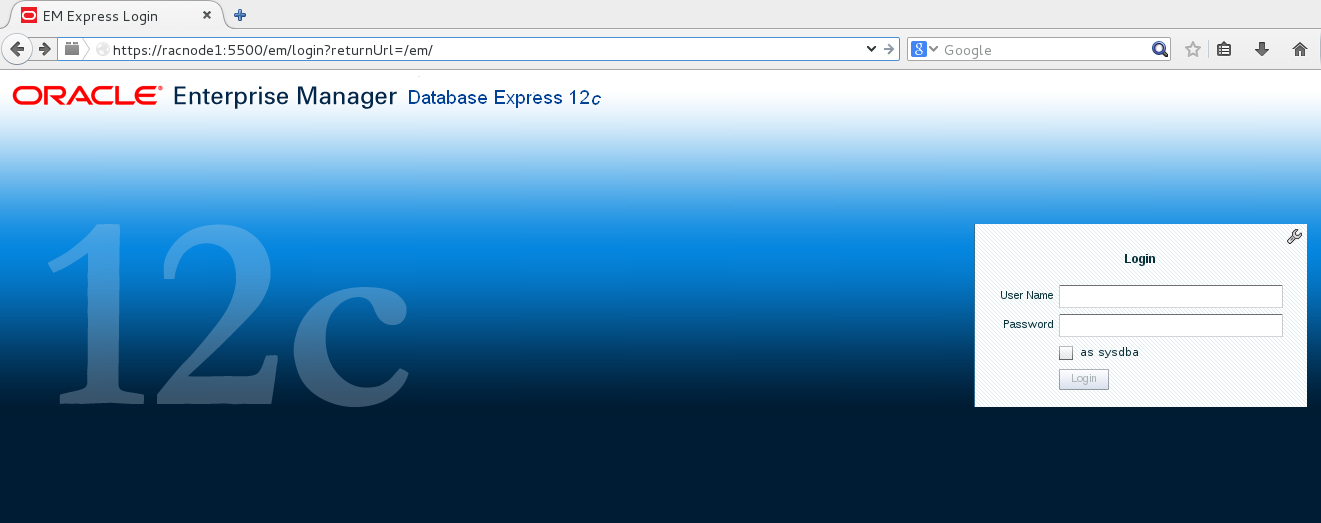
OEM Logon


Automating 12c Database Startup and Shutdown on Oracle Linux 7

PURPOSE

Oracle recommends to configure the system to automatically start Oracle Database when the system starts, and to automatically shut it down when the system shuts down.

Environment:
Operating System:     Oracle Linux 7
Oracle Database:        Oracle 12.1.0.2

SOLUTION

  • Check and configure  /etc/oratab appropriately
    If you want dbstart to auto-start a single-instance database that uses an ASM server that is auto-started by CRS (this is the default behavior  for an ASM cluster), you must change the database’s ORATAB entry to use  a third field of “W” and the ASM’s ORATAB entry to use a third field of “N”.
  • Change directory to /etc/init.d, and create a file “dbora” with below contents. The Oracle doc has got typo for this script part  “runuser $HOST -l $ORACLE  $0 $1 ORA_DB”, which will cause failure.
$ cat dbora
#! /bin/sh -x
#
# Change the value of ORACLE_HOME to specify the correct Oracle home
# directory for your installation.
ORACLE_HOME=/u01/app/oracle/product/12.1.0/dbhome_1
#
# Change the value of ORACLE to the login name of the
# oracle owner at your site.
#
ORACLE=oracle
PATH=${PATH}:$ORACLE_HOME/bin
HOST=`hostname`
PLATFORM=`uname`
export ORACLE_HOME PATH
#
if [ ! "$2" = "ORA_DB" ] ; then
#runuser $HOST -l $ORACLE  $0 $1 ORA_DB
    runuser  -l $ORACLE  $0 $1 ORA_DB
if [ "$PLATFORM" = "Linux" ] ; then
touch /var/lock/subsys/dbora
fi
exit
fi
#
case $1 in
'start')
$ORACLE_HOME/bin/dbstart $ORACLE_HOME &
;;
'stop')
$ORACLE_HOME/bin/dbshut $ORACLE_HOME &
;;
*)
echo "usage: $0 {start|stop}"
exit
;;
esac
#
exit
  • Change file “dbaora” with right group name and permission.
# chgrp dba dbora
# chmod 750 dbora
  •  Create symbolic links to the dbora script in the appropriate run-level script directories:
Platform Symbolic Links Commands
Oracle Solaris
# ln -s /etc/init.d/dbora /etc/rc0.d/K01dbora
# ln -s /etc/init.d/dbora /etc/rc3.d/S99dbora
Linux
# ln -s /etc/init.d/dbora /etc/rc.d/rc0.d/K01dbora
# ln -s /etc/init.d/dbora /etc/rc.d/rc3.d/S99dbora
# ln -s /etc/init.d/dbora /etc/rc.d/rc5.d/S99dbora
IBM AIX on POWER Systems (64-Bit)
# ln -s /etc/dbora /etc/rc.d/rc2.d/S99dbora
# ln -s /etc/dbora /etc/rc.d/rc0.d/K01dbora

Check the logs

  • /var/log/messages
  • $ORACLE_HOME/listener.log
  • $OACLE_HOME/shutdown.log
  • $ORACLE_HOME/startup.log

How to send email notifications for dbms_scheduler jobs

SITUATION

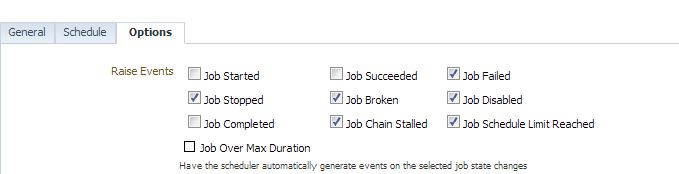
Jobs can be scheduled  from either OEM ( Oracle Enterprise Manager ) or database DBMS_SCHEDULER. The following two pictures  show the boxes ticked will trigger notifications when the event happens.

Environment:

                 OEM : 12c or 13c
                 Database: any versions

(picture 1 ) — OEM JOB

OEM Job Email Notification


( picture 2 )– DBMS_SCHEDULER JOB

DBMS_SCHEDULER Job Notification

Email notification for OEM jobs works fine, but we could not receive email notifications from DBMS_SCHEDULER  jobs.

SOLUTION

Subscribe to get access

Read more of this content when you subscribe today.

Sample script to drop interval partitions

SITUATION

The big benefit of using interval partition is automatic partition creation when new records are inserted. But we need purge the history partitions by developing in-house scripts.

SQL> desc user_tab_partitions;

Name Null? Type
----------------------- -------- --------------
TABLE_NAME VARCHAR2(30)
COMPOSITE VARCHAR2(3)
PARTITION_NAME VARCHAR2(30)
SUBPARTITION_COUNT NUMBER
HIGH_VALUE LONG
HIGH_VALUE_LENGTH NUMBER
PARTITION_POSITION NUMBER

SOLUTION

Here is a basic sample script for dropping partitions more than 20 days old.

SQL> set serveroutput on
SQL> declare
dt date;
begin
for x in (select table_name,partition_name, high_value
from user_tab_partitions where INTERVAL='YES' )
loop
execute immediate 'select '||x.high_value||' from dual' into dt;
if dt < sysdate - 20
then
dbms_output.put_line('to drop partition: '||x.table_name||'.'||x.partition_name);
execute immediate 'alter table '||x.table_name||' drop partition '|| x.partition_name||' update indexes ';
end if;
end loop;
end;
/

to drop partition: TBL_TEST1.SYS_P277
to drop partition: TBL_TEST1.SYS_P221
to drop partition: TBL_TEST2.SYS_P231
to drop partition: TBL_TEST2.SYS_P281
to drop partition: TBL_TEST3.SYS_P226
to drop partition: TBL_TEST3..SYS_P242

PL/SQL procedure successfully completed.